
5 Best Merchant Services for Small Business: Fees Compared
The best merchant services for a small business are the ones with the lowest full cost on your card mix and sales channels, and that fit your software and support needs. Square suits in-person shops. Helcim suits businesses with larger tickets that want interchange-plus pricing. Stripe suits online and software sellers. PayPal suits international online checkout. CoinPay suits merchants selling online to customers in Southeast and South Asia.
Advertised rates rarely match what lands on your statement. A fixed fee on every sale, a monthly subscription, or a card mix heavy on rewards cards can change your real cost noticeably. Owners who compare only the headline percentage often learn that from the first statement.
This article ranks five options on the same three checks: how each works, what it costs, and who it suits. After the list, a table prices them against the same $20,000 in monthly sales, and a short checklist covers what to confirm before you sign. CoinPay is our own service, so we say plainly where it fits. It is built for merchants in Asian markets, not for a U.S. card-present shop.
1. CoinPay, for online sales in Southeast and South Asia
CoinPay is the right pick when your customers pay through local methods in Asia rather than with U.S. cards. It is a hands-on partner for businesses that need that coverage.
How it works
CoinPay is a payment gateway provider for merchants in Southeast and South Asian markets. It handles merchant onboarding and verification, then the ongoing payment operations. A legitimate business can then accept payments in local currencies and through local payment methods, such as PromptPay with THB settlement in Thailand. Coverage includes Thailand, Vietnam, the Philippines, Malaysia, Bangladesh, India and Indonesia.
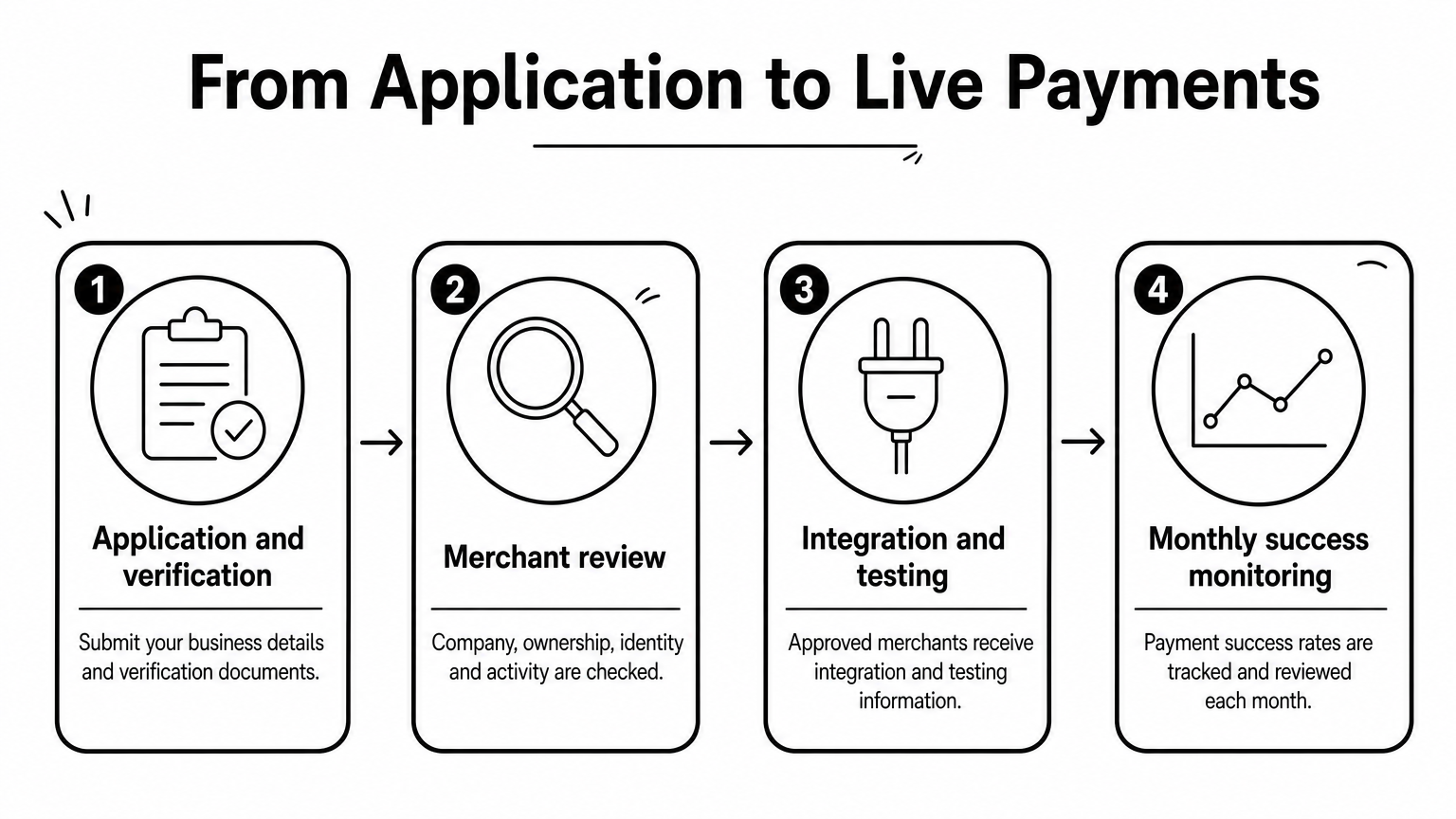
The process runs in four stages:
- An application and business verification, followed by service setup before any processing begins.
- A merchant review that may cover company information, ownership details, identity checks and business activity.
- Integration and testing information for approved merchants.
- Monthly success-rate monitoring, so you can see how payments perform over time.
USDT (stablecoin) payments are a separate service, so ask about them separately.
Pricing
Its gateway operations are organized by market, payment journey and settlement needs. Ask for a written quote that names the settlement currency, settlement timing and per-transaction fees for each market.
Judge it on success rate and support, not on a headline percentage. You can reach the team at sales@coinpay.world or through Telegram.
Who it suits
CoinPay fits business owners and payment managers at e-commerce, gaming, fintech and other online platforms that need local-currency settlement in the markets above. It has five years of operating experience and screens merchants closely. It does not accept fraudulent or deceptive businesses, pyramid or money-game schemes, or misleading investment models. It also expects merchants to apply customer and age checks where required.
A U.S. coffee shop that wants a card reader by Friday should look at the next four options instead. CoinPay is a long-term infrastructure partner, not an instant sign-up.
If your customers pay through local rails in Asia, a U.S. card processor is the wrong comparison.
2. Square, for in-person and POS-first shops
Square is the easiest starting point for a shop that sells face to face and wants payments, POS and invoicing in one system.
How it works
Square processes credit card and mobile wallet payments in person and online. It is part of a larger ecosystem that includes POS, invoicing and booking tools. Applications are usually approved quickly and setup is simple.
Useful features include:
- Tap to Pay on iPhone and Android
- Afterpay
- Integrations with Facebook, Instagram and Google Business profiles
- A POS app and a website builder
Pricing
Square's free plan charges 2.6% plus 15 cents in person and 3.3% plus 30 cents online. Paid subscriptions, Square Plus and Square Premium, start at $49 per month and reduce processing fees. Published in-person rates range from 2.4% plus 15 cents to 2.6% plus 15 cents depending on the plan, and custom pricing exists for eligible businesses.
That makes the subscription a math problem. Compare its monthly cost with the fee savings on your actual volume before you pay for it.
Who it suits
Square suits small retail shops, coffee shops, food trucks, stylists and startups. Its online rate is higher than its in-person rate, so a business that sells mostly online has better options. Check which software features need a paid plan before you commit.
Square wins on convenience, and a paid plan only pays off once your volume covers its monthly fee.
3. Stripe, for online and software businesses
Stripe is the strongest option when your checkout lives on a website or inside software you build or run.
How it works
Stripe is a payment service provider. It aggregates merchant accounts, so you can accept payments without opening your own merchant account. It offers payment links, embedded buy buttons and Stripe-hosted checkout pages, plus low-code options for connecting to your site or SaaS app. It also powers payments inside platforms such as Shopify, Lightspeed, Mindbody and Docusign.
Pricing
Stripe's published rates are 2.7% plus 5 cents in person and 2.9% plus 30 cents online. Standard and custom pricing both exist, and extras such as subscription billing, international cards and currency conversion carry their own charges. Add developer time to your budget if you build a custom checkout.
Dashboards, invoicing and prebuilt payment forms are included in the product set. Price the exact products you will use, not just the basic rate.
Who it suits
Stripe is best for SaaS vendors and online-only sellers that want payments to plug into their existing tools. A retailer with a counter and a card reader gets less from it. Ask what reserve terms, payout schedule and support channels apply to your account before you build on it.
Stripe is a toolkit, so it rewards businesses that have someone to build with it.
4. Helcim, for interchange-plus pricing
Helcim is the pick when you want to see exactly what the card networks charge and what the processor adds on top.
How it works
Helcim uses interchange-plus pricing. You pay the rate set by the card networks plus a fixed Helcim markup. Accounts include a free POS, hosted payment pages and invoicing tools. It is also HIPAA-compliant and provides business associate agreements on request. Helcim advertises no monthly fees and no contracts.
Other features include:
- Tap to Pay on iPhone
- A fee-saver (surcharging) option
- A subscription manager
- A hosted online store
- Unlimited electronic invoices
Pricing
Below $50,000 in monthly processing, the markup is 0.40% plus 8 cents in person or 0.50% plus 25 cents online, added to interchange. Volume discounts apply above $50,000 a month. Because interchange varies by card, your monthly total moves with your card mix, which makes budgeting harder than with a flat rate.
Who it suits
Helcim suits established stores, B2B sellers, private practitioners and service providers. It is strongest when tickets are large or customers pay mostly with debit cards, because the percentage markup stays small. Very small tickets are less of a concern, since its fixed fees are lower than the flat-rate providers' in the table below.
Interchange-plus pays off when your tickets are large or your cards are mostly debit.
5. PayPal, for international online checkout
PayPal earns its place when customers already trust the PayPal button and you sell across borders.
How it works
PayPal brings merchant tools together in one platform, PayPal Open. It connects to many e-commerce systems and lets merchants accept international payments. At checkout, customers can pay with a PayPal account, Venmo, Pay Later, or a debit or credit card.
Built-in seller protection is a headline feature. Others include Tap to Pay on iPhone, a POS system, mobile apps, shipping tools and customizable reports.
Pricing
PayPal's published rates are 2.29% plus 9 cents in person, 2.99% plus 49 cents for PayPal Checkout, and 2.89% plus 29 cents for Expanded Checkout. The 49-cent fixed fee on PayPal Checkout is the one to watch on small orders.
Who it suits
PayPal suits international e-commerce sellers and independent creators. Its in-person rate is the lowest flat rate on this list, but its checkout fees are among the highest. If most of your sales are online and under $20, price the fixed fee before you choose it.
PayPal is cheapest at the counter and priciest on small online orders, so check your ticket size first.
Fees side by side on $20,000 in monthly sales
On the same volume, the four U.S. card providers land within about $100 of each other in person and about $100 online, apart from Helcim, whose interchange you add on top. The table assumes $20,000 in monthly card sales across 400 transactions of $50 each, using the base published rates above. CoinPay is left out because it serves merchants in Southeast and South Asian markets.
Cost on the same monthly volume
| Provider | Pricing model | In person, per month | Online, per month |
|---|---|---|---|
| Square (free plan) | Flat rate | $580 (2.9%) | $780 (3.9%) |
| Stripe | Flat rate | $560 (2.8%) | $700 (3.5%) |
| PayPal | Flat rate | $494 (2.5%) | $794 with PayPal Checkout (4.0%) |
| Helcim | Interchange-plus | $112 markup plus interchange | $200 markup plus interchange |
Helcim only beats Square's free plan in person if the interchange on your cards averages below about 2.3% of sales, which is $468 on this volume. Subscriptions, negotiated rates and custom pricing can change every row, so confirm current figures on each provider's pricing page.
Flat rate versus interchange-plus
Flat-rate pricing bundles all costs into one percentage plus a fixed fee, which is predictable but costly on large tickets. Interchange-plus passes through the card network's rate and adds a markup, which is more transparent and often cheaper at higher volume. Subscription models charge a monthly fee for near-wholesale rates. Tiered pricing sorts sales into qualified, mid-qualified and non-qualified buckets and is the least transparent.
Typical processing fees run from about 1.3% to 3.5% per transaction plus 10 to 30 cents. To find your own number, divide total processing fees by card sales and multiply by 100. For example, $2,300 in fees on $100,000 of sales is a 2.3% effective rate.
What the fixed fee does to small sales
A flat fee punishes small tickets. On a $10 online sale, Stripe's rate costs 59 cents, which is 5.9% of the sale. PayPal Checkout costs about 79 cents, or 7.9%. If your average order is under $15, the fixed part of the fee matters more than the percentage.
Compare providers on the effective rate for your average ticket, not the advertised percentage.
How to choose and what to check before signing
Choose by sales channel first, then confirm five details in writing, and if you sell online in Southeast or South Asia, see CoinPay in a free demo. A provider that looks cheapest on a pricing page can lose once software, hardware and contract terms are counted.
Five checks before you commit
- Software compatibility. Confirm your POS, accounting or e-commerce platform supports the processor.
- Your own statements. Calculate your effective rate and ask each provider to price the same transaction mix.
- Contract and hardware. Look for month-to-month terms, early termination fees and who owns the equipment.
- Funding and support. Ask about payout timing, holds and reserves, and how to reach a live person when a deposit goes missing.
- Security and disputes. Confirm PCI DSS coverage, fraud tools such as CVV and AVS, and how chargebacks are handled.
The cheapest way to accept cards
No processor is truly free. The cheapest option is whichever gives the lowest effective rate on your card mix, and an EMV chip reader is usually the lowest-cost way to take cards in person. Surcharging, such as Helcim's fee-saver option, shifts the fee to the customer, but rules differ by state and card network, so check them first.
Setting up as an LLC
An LLC can accept cards like any other business. You apply with your business information, and settling into a dedicated business bank account keeps your finances separate. Applications to third-party processors are usually approved quickly, while a full merchant account takes a few days of underwriting.