
FPX Payment Gateway Integration: Step-by-Step for Malaysia
To complete FPX payment gateway integration, pick a licensed gateway that supports FPX, register your business with it, call its API to create a payment, and redirect the customer to their bank. Then confirm the result with a signed server-side callback before you fulfill the order. Most merchants go live through a gateway rather than a direct bank connection. The approval step usually takes longer than the coding.
The problem is that FPX information is scattered. Developer forums ask how to connect without a gateway. Bank documents talk about merchant registration forms and test environments. Gateway docs assume you already have approval. Many merchants also mix up FPX, which is a payment network, with the gateway that connects to it. The result is wasted weeks, rejected applications, and checkouts that break when a customer's bank is slow.
This guide covers the full path in five parts: what FPX is and what you need, how to choose your integration route, how to register and get credentials, how to build and secure the payment flow, and how to test and go live. CoinPay works with merchants in Malaysia and handles onboarding, verification, and ongoing support, so the guide also flags where that preparation matters.
What FPX is and what you need first
FPX stands for Financial Process Exchange. It is Malaysia's real-time online banking payment network, operated by PayNet. FPX is not a payment gateway. A gateway is the service that connects your website or app to FPX and settles the money to you.
How an FPX payment flows
Every FPX payment follows the same path, whatever gateway you use:
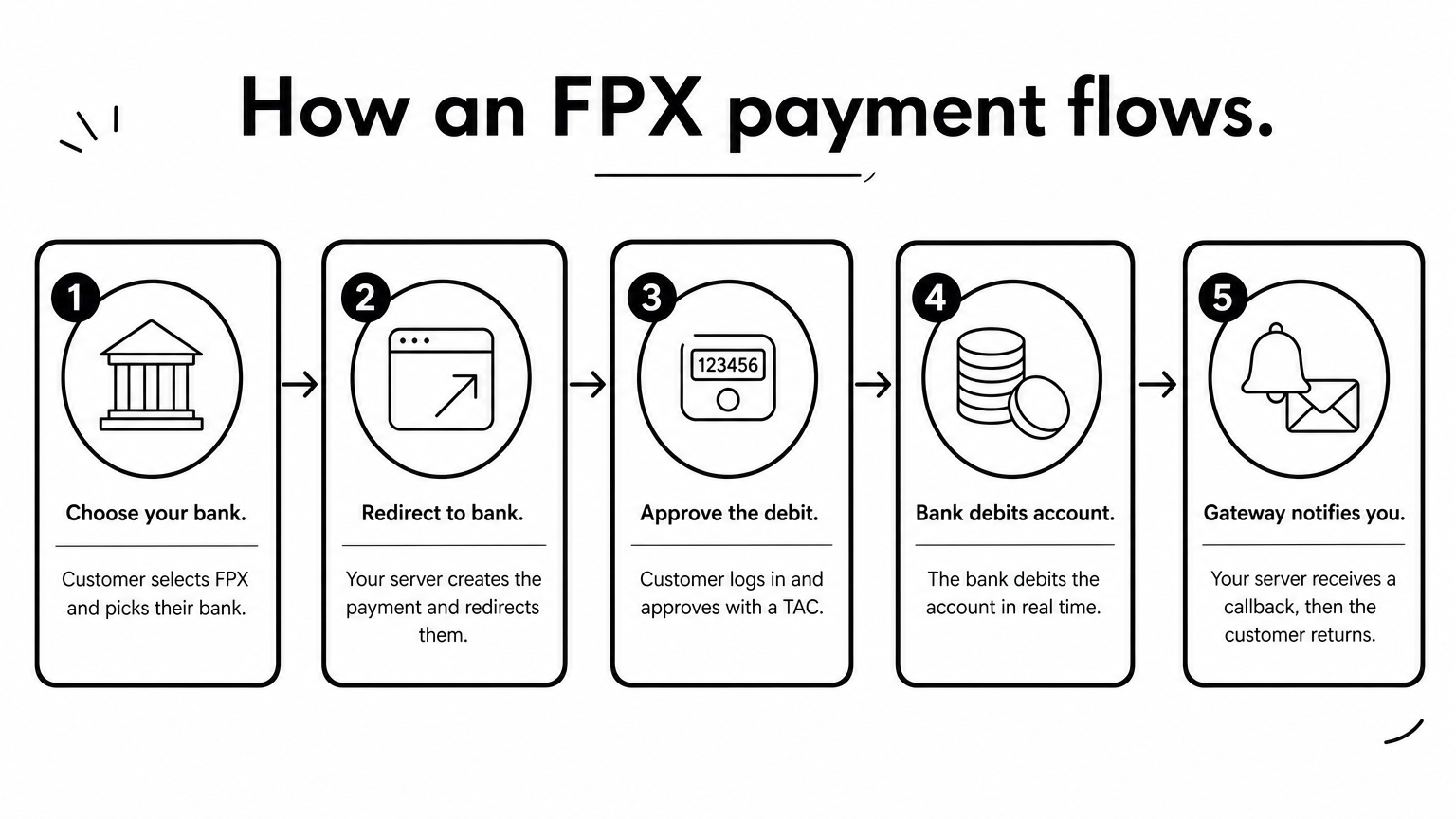
- The customer selects FPX at checkout and picks their bank.
- Your server asks the gateway to create a payment, and the customer is redirected to the bank's online banking page.
- The customer logs in and approves the amount, often with a TAC or one-time password.
- The bank debits the account in real time.
- The gateway notifies your server, and the customer returns to your site.
You never see the customer's banking credentials. FPX is also a direct bank debit, not a credit card payment, so customers need an online banking account at a participating bank. More than 20 Malaysian banks take part, including the large ones such as Maybank, CIMB, Public Bank, RHB, and Hong Leong.
FPX moves money from the customer's bank to yours, and the gateway is only the bridge.
What to prepare before you start
Gather these items first, because approval will ask for them:
- A registered business with its incorporation or registration documents.
- A business bank account that can receive MYR settlements.
- A live website or app that shows your products, prices, and contact details.
- Published terms, refund policy, and privacy pages.
- A developer who can work on your server, since keys and callbacks must never live in front-end code.
Plan for transaction limits too. A typical FPX limit is MYR 30,000 per transaction for individual accounts. The customer's own internet banking limit can be lower.
Step 1. Pick your integration route
You have two routes for FPX payment gateway integration: connect directly through an acquirer or bank, or use a payment gateway with an API. For almost every merchant, the gateway route is faster and cheaper to maintain. Choosing a payment gateway for Malaysia FPX is mostly a question of who carries the technical and operational load.
Direct connection or gateway
| Factor | Direct via acquirer or bank | Through a gateway |
|---|---|---|
| Who handles FPX messages | You, using the integration kit | The gateway |
| Testing | Your own system and user acceptance testing | Sandbox plus your own tests |
| Other payment methods | Separate work for each | Often one API for several |
| Reconciliation | You build it | Usually dashboard and reports |
| Best for | Large teams with banking staff | Most merchants and platforms |
The direct route means building to the FPX integration kit, signing messages with keys, and passing formal testing before you receive production credentials. That is real engineering work and ongoing maintenance. A gateway absorbs it and gives you a single FPX payment gateway API to call.
Questions to ask a gateway
Ask each candidate the same questions before you apply:
- Is it licensed or authorized to operate in Malaysia?
- Which currency does it settle in, and how soon after a payment?
- How are fees charged, per transaction or monthly, and are there setup fees?
- Does it offer a sandbox, and are the docs clear on callbacks and signatures?
- How does it handle bank downtime, pending payments, and refunds?
- Who do you contact when a payment goes missing?
That last question matters more than merchants expect. CoinPay positions itself as a merchant-focused partner with hands-on support after integration, not just a connector, and it screens merchants strictly. Expect to be reviewed in return.
Choose the gateway whose support and settlement terms you can live with, because the API is the easy part.
Step 2. Register and get your credentials
Registration gives you the credentials to call the API, and it is the slowest step in FPX payment gateway integration. Start it before you write any code. Your developers can build against a sandbox while approval runs.
Submit your application
The process looks like this:
- Fill in the gateway's application with your company details, website, and expected volumes.
- Upload your business documents and ownership information for KYC.
- Wait for due diligence, and answer follow-up questions quickly.
- Receive sandbox credentials, then live credentials after approval.
On the direct route, you complete a Merchant Registration Form through your acquirer or seller bank. You receive test Exchange and Seller IDs, complete system integration and user acceptance testing, and receive production IDs after sign-off. A gateway does this behind the scenes.
Accuracy decides how fast you pass. Your website must match what you declare, and reviewers reject unclear business models, scams, money games, and deceptive schemes. CoinPay applies the same standard, which protects legitimate merchants in the long run.
Approval time, not code time, sets your launch date, so apply first and build in parallel.
Handle your keys safely
You will typically receive a public identifier, a secret API key, and a webhook secret. Keep sandbox and live keys separate. Store them in environment variables or a secrets manager. Never put the secret key in a mobile app, a JavaScript bundle, or a public repository, because anyone who finds it can create payments or read data in your name.

Step 3. Build the payment flow
Your FPX payment gateway API work has two parts: create the payment on your server, then verify the result when the gateway calls you back. The code below is an illustrative Node.js pattern. The endpoint, header, and field names are placeholders, so use the exact names from your gateway's documentation.
Create the payment on your server
Save the order as pending first, then request the payment and redirect the customer.
app.post("/checkout", async (req, res) => {
  const order = await db.orders.create({ amount: req.body.amount, status: "pending" });

  const r = await fetch("https://api.your-gateway.example/v1/payments", {
    method: "POST",
    headers: {
      Authorization: `Bearer ${process.env.GATEWAY_SECRET_KEY}`,
      "Content-Type": "application/json"
    },
    body: JSON.stringify({
      reference: order.id,
      amount: order.amount,
      currency: "MYR",
      payment_method: "fpx",
      redirect_url: "https://yourshop.example/order/return",
      callback_url: "https://yourshop.example/webhooks/fpx"
    })
  });

  const payment = await r.json();
  res.redirect(payment.checkout_url);
});
Use a unique reference for every order so you can match payments later. Check whether the gateway expects the amount in ringgit or sen, because a unit mistake charges customers 100 times too much or too little.
Verify the callback before you ship
The customer's return to your site proves nothing, since they can close the tab or edit the URL. Trust only the signed server-to-server callback.
const crypto = require("crypto");

app.post("/webhooks/fpx", express.raw({ type: "application/json" }), async (req, res) => {
  const expected = crypto
    .createHmac("sha256", process.env.GATEWAY_WEBHOOK_SECRET)
    .update(req.body)
    .digest("hex");
  const received = req.get("X-Signature") || "";

  const valid =
    received.length === expected.length &&
    crypto.timingSafeEqual(Buffer.from(received), Buffer.from(expected));
  if (!valid) return res.sendStatus(401);

  const event = JSON.parse(req.body);
  const order = await db.orders.find(event.reference);

  if (order.status === "pending" && event.status === "paid" && event.amount === order.amount) {
    await db.orders.markPaid(order.id);
  }
  res.sendStatus(200);
});
This handler checks the signature, compares the amount, and only updates pending orders. That last check makes it safe against duplicate callbacks, which gateways do send.
Never mark an order paid from the browser redirect, only from a verified callback.
Step 4. Test, go live, and monitor
Test every outcome in the sandbox, switch to live keys, then watch success rates by bank. A checkout that only works when the customer pays successfully is not finished. Bank-redirect flows fail in more ways than card forms do, so your FPX payment gateway integration needs tests for each of them.
Test the cases that break checkouts
Run each of these in the sandbox and confirm that your order status ends up correct:
- Successful payment and return to your site.
- Customer cancels at the bank page.
- Customer closes the browser and never returns.
- Bank rejects or fails the authorization.
- Duplicate callback for the same order.
- Callback arrives before the customer returns.
- Amount above the allowed limit.
Also decide what pending means. If no result arrives after your timeout, query the gateway's status endpoint instead of cancelling blindly. A customer may have paid just as their session expired.
Go live and watch performance
Switch to live keys and make one small real payment with your own account. Check that the callback arrives, the order updates, and the settlement shows up in your MYR bank account on the promised schedule. Then reconcile daily. Match gateway reports against your orders and investigate every mismatch.
After launch, track the success rate per bank, the number of pending orders, and how many customers abandon at the redirect. A single bank with a poor rate is a signal to show clearer messaging or a backup payment method. CoinPay's approach is to identify payment friction, improve deposit journeys, and monitor performance, and you can run the same review yourself every week.
Treat go-live as the start of monitoring, not the end of the project.
Next steps for your FPX launch
FPX integration comes down to four moves: choose a gateway instead of building direct, apply early with accurate documents, create payments server-side and trust only signed callbacks, and test every failure before real customers see it. Do those in order and the code is the easy part.
If you want a partner that screens merchants carefully and stays involved after launch, talk to the team about your Malaysian setup. You can schedule a free demo with CoinPay and walk through your volumes, settlement needs, and integration plan.