
How to Set Up a Payment Gateway in India, Step by Step
If you want to know how to set up payment gateway in India, the path is short. Confirm that your business type is eligible, gather your PAN, bank, and identity documents, choose a provider that operates under RBI rules, submit KYC online, then integrate and test before you go live. With clean paperwork, approval usually takes days rather than months.
The trouble is that nobody explains the order. First-time sellers stall on questions like whether they need a registered company, whether GST is compulsory, and whether a personal savings account is enough. Each provider's website only describes its own onboarding flow, so you end up comparing half-answers across a dozen tabs.
This guide fixes that. It covers eligibility and documents first, then four steps: pick the gateway model, compare providers, apply and clear KYC, and integrate and test. At CoinPay we onboard merchants across seven Asian markets, India included, so the checks below are the ones a reviewer actually runs on your application.
Who can get a payment gateway and what you need
Most registered businesses and sole proprietors in India can get a payment gateway, and some providers also onboard individuals, though acceptance varies. Whatever your structure, every reviewer checks the same three things: who owns the business, whether the bank account matches that owner, and whether your website looks legitimate.

Eligibility by business type
A private limited company, LLP, or partnership firm is the easiest profile to approve, because the entity, its PAN, and its bank account all line up. A sole proprietor can usually apply with a personal PAN, ID, and proof that the business exists. Freelancers and individuals are accepted by some providers and refused by others, so ask before you invest time. Typical documents look like this:
| Business type | Typical documents |
|---|---|
| Private limited company | Company PAN, certificate of incorporation, director ID and address proof, bank account details |
| LLP | LLP agreement, certificate of incorporation, firm PAN, partner KYC, bank account details |
| Partnership firm | Partnership deed, firm PAN, partner KYC, bank account in the firm's name |
| Sole proprietor | Owner's PAN and ID, business proof such as Udyam or GST registration, bank account |
| Individual or freelancer | Personal PAN, ID and address proof, bank account in your own name |
Exact lists differ by provider, so confirm them on the onboarding page. Name matching is where most applications slip. The name on your PAN, bank account, and registration papers must agree, down to the spelling.
Providers approve the business behind the website, so every name on your documents and bank account should match.
GST and the bank account
GST registration is not a condition for opening an account with every provider, but the law may require it from you. You must register once annual turnover crosses ₹40 lakh for goods or ₹20 lakh for services (lower limits apply in some states), and some sellers must register regardless of turnover. Gateway fees also carry 18% GST, which a registered business can usually claim as input credit.
Plan the bank account early. Providers settle to an account in the business's name, and a current account is the standard choice for companies and LLPs. Some providers accept a proprietor's savings account, but the provider's policy decides, not a rule of thumb.
Get your website ready
Reviewers open your site before they approve you. Publish these items first:
- Live product or service pages with clear descriptions and prices in INR
- A privacy policy and terms of service
- A refund and cancellation policy
- A contact page with business address, phone, and email
- A shipping policy, if you sell physical goods
- A business name that matches your registration documents
Step 1. Pick the gateway model
Choose between a payment aggregator, a bank gateway, and a multi-market partner based on how fast you need to launch and where your customers are. A new website selling mainly in India should usually start with an aggregator.
The three models compared
| Model | How onboarding works | Best for |
|---|---|---|
| Aggregator (Razorpay, Cashfree, PayU, CCAvenue, Paytm, PhonePe) | Online application, pooled settlement, fast approval | New and growing websites |
| Bank gateway (HDFC, ICICI, SBI) | Direct bank relationship, often tied to a current account with that bank, heavier paperwork | Established companies with high volume |
| Multi-market partner (CoinPay) | Structured application with KYC and due diligence, ongoing support after integration | Merchants taking payments in India and other Asian markets |
Why aggregators suit most new sites
An aggregator lets you accept payments without negotiating a merchant account with a bank. The provider holds the regulatory approval and settles to your account. Under RBI's payment aggregator rules, that provider must be authorized, so check RBI's published list of authorized payment aggregators before you sign up.
Bank-run gateways, such as SBI's SBIePay or the offerings from HDFC and ICICI, make sense when you already bank there and process steady volume. Expect more paperwork and a slower start. If you also sell in Thailand, Vietnam, the Philippines, Malaysia, Bangladesh, or Indonesia, a partner that works across those markets saves you from running a separate onboarding in each. That is the gap CoinPay fills when you set up payment gateway access for more than one country.
Start with an aggregator unless volume or multi-market plans give you a clear reason not to.
Step 2. Compare fees, settlement, and support
Compare providers on total cost per payment method, settlement speed, supported methods, checkout options, and support quality. There is no single best payment gateway in India, only the best match for your volume and product.
What to compare
- Fees by method: Ask for cards, UPI, netbanking, wallets, and international cards separately. Headline domestic card rates commonly sit near 2% plus 18% GST. Major aggregators such as Razorpay advertise zero setup fees, so you pay per transaction. UPI is priced differently from cards, so get that number in writing.
- Settlement time: Standard cycles are commonly a couple of business days. Faster settlement is sometimes available for an extra fee.
- Payment methods: UPI is essential for Indian shoppers. Add cards, netbanking, wallets, and EMI only if your buyers use them.
- Checkout options: Hosted pages, payment links, plugins, and APIs. Match them to your tech skills.
- Support: A named contact or a fast chat channel beats a ticket queue when a payment fails.
Cash flow matters more than a small rate gap. A cheaper rate with slow settlement or unreachable support often costs more than it saves.
Judge a gateway by its total cost and its support on a bad day, not by the headline rate.
Questions to send before you apply
Providers answer sales emails faster than you expect, and their replies reveal how they treat merchants. Copy this template and fill in the brackets:
Subject: Onboarding questions for [your business name]

Hi team,

We run [website URL], selling [product or service] to customers in [markets]. Before we apply, please confirm:

1. Fees per method: domestic cards, UPI, netbanking, wallets, international cards
2. Standard settlement time and any faster option, with its fee
3. Documents needed for a [company / LLP / proprietorship]
4. Typical approval time and any restricted business categories
5. How refunds, chargebacks, and disputes are handled
6. Support channels and response times

Thanks,
[Your name]
Step 3. Apply and clear KYC
Apply online with scanned documents and your bank account ready. Providers verify your identity, business, and bank details before they enable live payments, which typically takes several working days and longer if reviewers ask follow-up questions.
The application, in order
- Sign up with a business email and mobile number.
- Select your business type and category, add your website URL, and describe what you sell in plain words.
- Upload your PAN, ID, and business registration documents.
- Add your bank account. Many providers verify it with a cancelled cheque or a small test deposit.
- Complete any extra identity check, such as e-sign or video KYC, if requested.
- Submit, then watch your inbox for reviewer questions.
Test mode is usually available right after sign-up, so your developer can start integration while the KYC review runs. You do not need to wait for approval to build.
Why applications stall
Most delays come from four causes: mismatched names across documents, missing policy pages on the website, a vague business description, and a restricted category. Answer reviewer questions the same day, and attach evidence rather than explanations. A screenshot of your refund policy page settles more than a paragraph of reassurance.
Expect scrutiny from any reputable provider. At CoinPay, merchant review includes KYC, due diligence, and compliance checks, and we turn away scams, money games, and deceptive schemes outright. A provider that approves anyone in minutes is a risk to your own settlements.
A fast approval is only useful if the provider will still be settling your money a year from now.
Step 4. Integrate, test, and go live
Integrate with the simplest method your site supports, test every payment outcome in test mode, then run one small live transaction to confirm settlement. This is the stage where you finish your payment gateway setup in India, and skipping tests is the most common way to lose real orders.
Choose an integration method
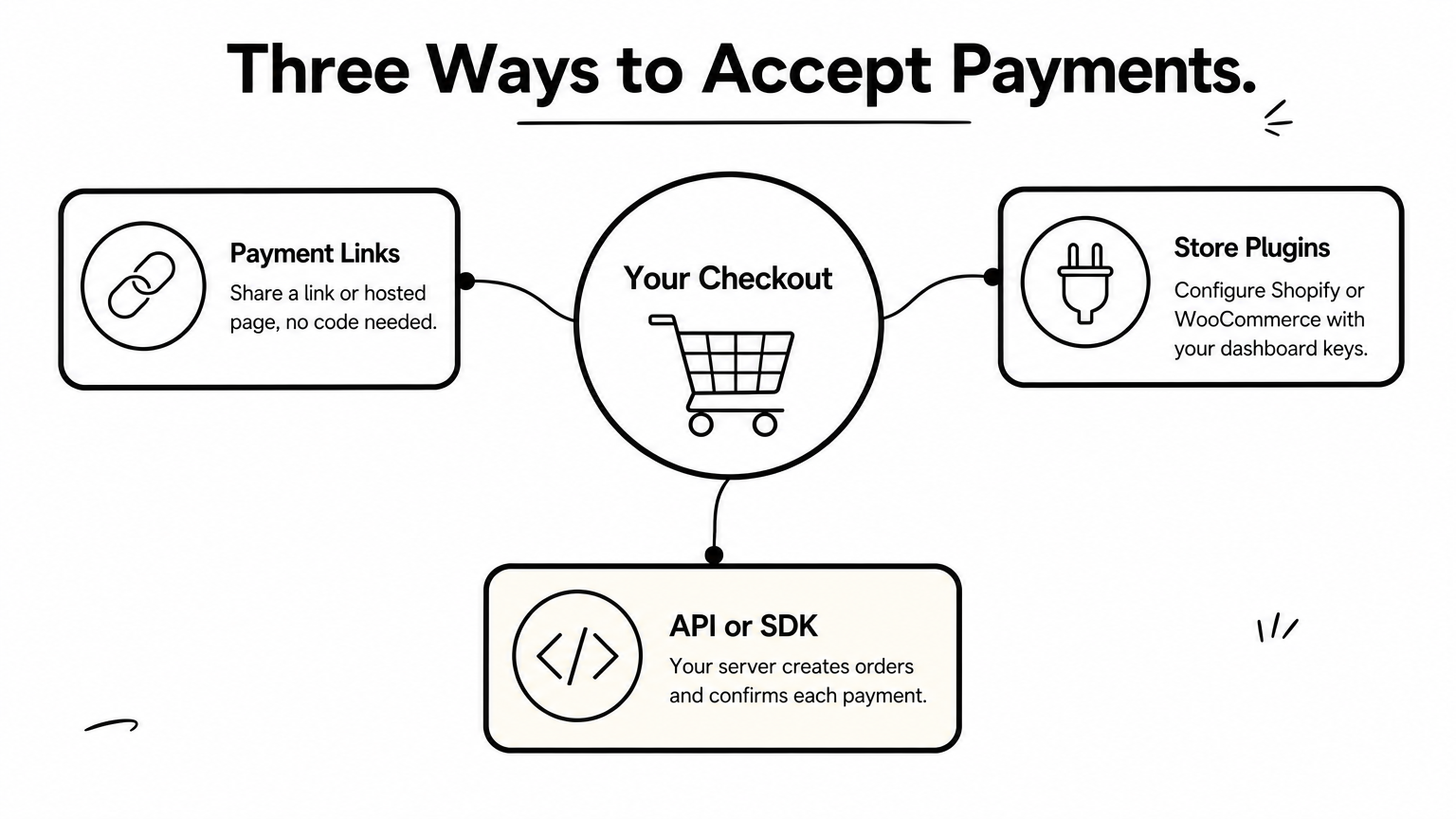
Pick from three routes. Payment links and hosted checkout need no code and keep card data off your servers. Plugins exist for platforms like Shopify and WooCommerce, and you configure them in your store settings with the keys from your dashboard. API or SDK integration suits custom sites: your server creates an order, the customer pays on the checkout, and your server confirms the result.
RBI rules stop merchants from storing full card numbers, so rely on the tokenization your provider supplies. Never build your own card storage.
Test before you take money
- Use test API keys to run successful, failed, and abandoned payments.
- Confirm payment status on your server through webhooks, not through the browser redirect.
- Keep secret keys on the server only, never in front-end code.
- Test full and partial refunds.
- Switch to live keys, make a small real payment, refund it, and check the settlement in your bank statement.
- Check that success and failure messages and confirmation emails fire correctly.
A payment is complete when your server confirms it, not when the customer's browser says so.
Getting your India payments live
Setting up a payment gateway in India comes down to four moves: match your documents and website to the provider's checks, pick a model that fits your volume, compare total cost and support, and test until every outcome behaves. Do the paperwork before you pick a provider and the approval stops being the slow part.
A small seller focused on India can launch quickly with an aggregator. If you accept payments across several Asian markets, or you want a team that stays involved after integration, get a free demo by booking a call with CoinPay and we will walk through your onboarding.