
Integration of Payment Gateway: 4 Steps from Setup to Live
The integration of payment gateway software into your website comes down to four moves. Choose a provider and get approved, collect your API keys, connect your checkout through a plugin or the API, then test in a sandbox before you switch to live mode. On a standard platform, a plugin can be running in a day. A custom API build takes longer. The cost is mostly per-transaction fees plus developer time.
Most integrations don't fail because of bad code. They stall at merchant approval, ship without testing declined payments, or go live with webhooks that never reach the server. The result is customers who paid but have no order, or orders marked paid that never were. The risk grows when you sell in several markets, because local payment methods like bank QR transfers behave differently from cards.
This guide follows the order you will actually work in. It starts with how a gateway works, then covers choosing a provider, keys and sandbox, the build itself, and testing. CoinPay onboards merchants across Southeast and South Asia, so some examples come from those markets.
How payment gateway integration works
A payment gateway sits between your checkout and the banking networks. It encrypts the customer's payment details, passes them on for approval, and returns an approved or declined result to you. Integration is the work of connecting your checkout and your server to that service.
What happens when a customer pays
Every card-style payment follows the same chain, and knowing it makes debugging much easier.
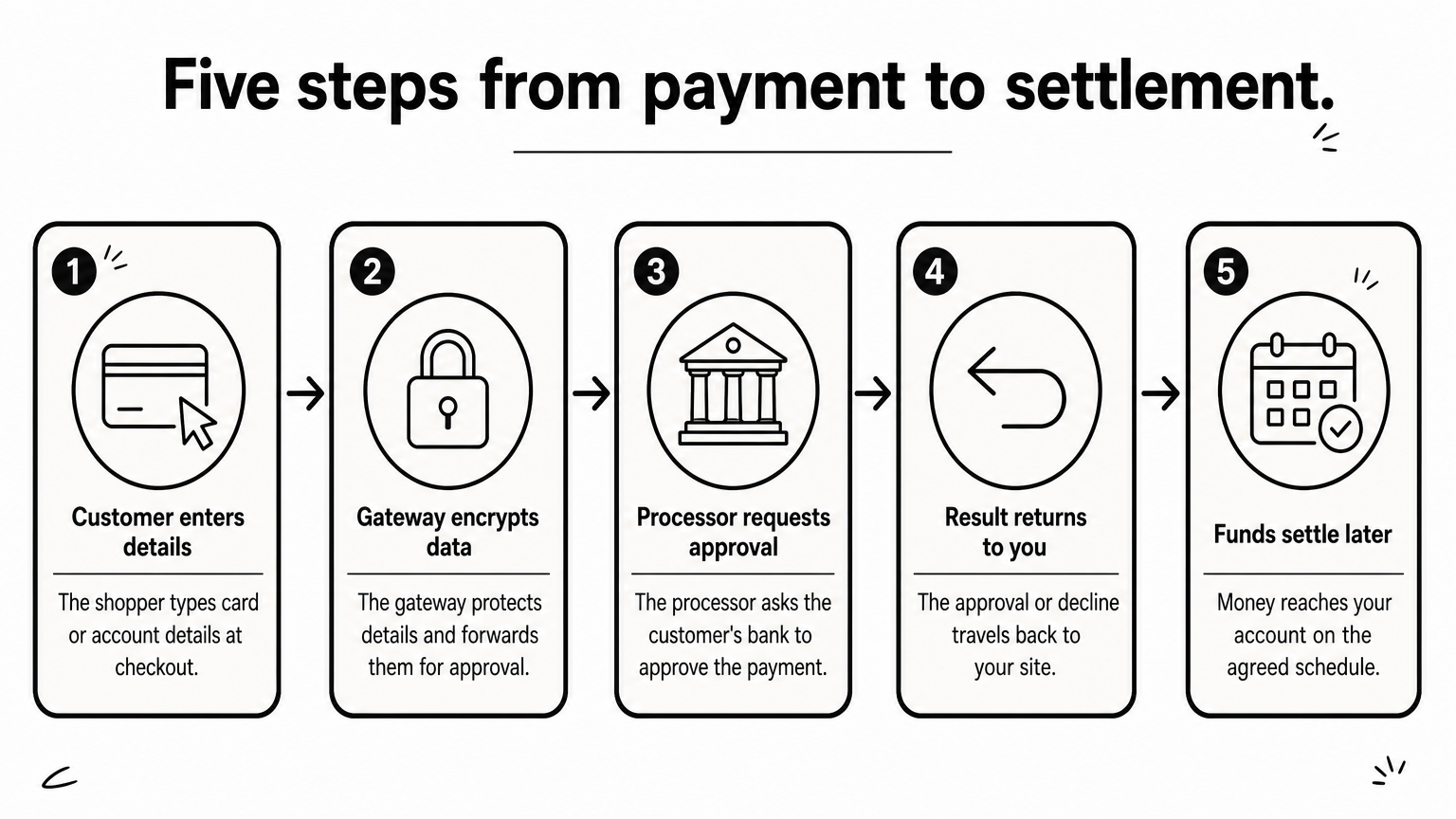
- The customer enters payment details on your checkout or on the provider's page.
- The gateway encrypts the data and forwards it to the payment processor.
- The processor asks the customer's bank or card issuer to approve it.
- The approval or decline travels back through the same chain to your site.
- Funds settle to your account later, on the schedule in your agreement.
Steps 1 to 4 take seconds. Settlement is separate, and it is why a payment can look successful in your dashboard days before the money arrives.
Hosted, plugin or API: pick your route
You can connect to a gateway in three ways. Your route decides how much code you write and how much security responsibility lands on you.
| Route | How it works | Effort | Card-data burden on you | Best for |
|---|---|---|---|---|
| Hosted page | Customer is redirected to the provider's page to pay | Lowest | Lowest | Fast launch, small teams |
| Plugin or extension | You install the provider's module on your platform (for example WooCommerce or Shopify) | Low | Low | Standard store platforms |
| API (integrated) | Checkout stays on your site and your server calls the provider | Highest | Higher, unless you use provider-hosted fields | Custom sites and apps |
Choose the hosted page or a plugin unless you have a clear reason not to. Choose the API when you need full control of the checkout or you run a custom app.
What you need before you start
Gather these first, because missing items cause most delays:
- Business documents for the provider's verification
- A site served over HTTPS
- Admin access to your platform, or a developer for custom code
- A server endpoint that can receive webhooks
- A short written test plan
Your server, not the customer's browser, must be the final authority on whether an order was paid.
Step 1. Choose a provider and get approved
Shortlist two or three providers that support the payment methods your customers use in your markets, then compare their total cost and apply. There is no single best gateway for everyone. The right one depends on where you sell, which currencies you settle in, and how much support you need.
Compare what matters
Score each candidate on the same five points:
- Payment methods for your customers' countries, such as cards, bank transfers, QR payments or wallets
- Settlement currency and timing
- Fees, covering every line in the table below, not just the headline rate
- Documentation and sandbox, so your developer can test before you commit
- Support after launch, not just during setup
If you sell in Thailand, Vietnam, the Philippines, Malaysia, Bangladesh, India or Indonesia, check local methods first. A gateway that only handles international cards will lose you customers who prefer bank QR or UPI.
What the integration costs
API access and a sandbox are usually free, so a free API is common. The real costs are below.
| Cost | How it is charged | What to check |
|---|---|---|
| Setup fee | One time | Many providers waive it |
| Monthly fee | Flat or volume-based | Minimums and platform charges |
| Per-transaction fee | Percentage plus a fixed amount | Different rates per method |
| Currency conversion | Percentage of the amount | Applies to cross-border payments |
| Refund and chargeback fees | Per event | Who pays on a dispute |
| Developer time | Hours or days | Plugin versus custom build |
Here is a worked example with a hypothetical rate, not a quote. Say you process 1,000 orders a month at $40 each, and the fee is 2.5% plus $0.30. Each order costs $1.00 plus $0.30, which is $1.30. Across 1,000 orders, that is $1,300 a month, or 3.25% of the $40,000 you sold. Run the same math on every offer.
Get through the application
Reputable providers review merchants before they process anything. At CoinPay, the process includes an application, business verification and service setup before processing begins. The review may cover company information, ownership details, identity checks and your business activity. Prepare registration documents and owner details up front, and describe your business plainly.
Compare providers on total monthly cost for your own order volume, never on the headline rate.
Step 2. Get your API keys and sandbox ready
After approval, you receive credentials and a test environment. Your job in this step is to store them safely and confirm your server can talk to the sandbox before you write any checkout logic.
Understand the keys
Most providers issue a public (or publishable) key and a secret key. The public key can sit in front-end code. The secret key must never appear in browser code, a public repository or a support ticket. Providers also issue separate test and live keys. A mix-up between them is a classic launch-day bug.
Store each credential as an environment variable on your server. If a secret leaks, rotate it in the provider dashboard immediately.
Set up the sandbox and webhooks
Create a configuration file with placeholders like these. Variable names are examples, and your provider's names will differ.
PAYMENT_API_BASE=https://sandbox.your-provider.example
PAYMENT_PUBLIC_KEY=pk_test_xxxxxxxx
PAYMENT_SECRET_KEY=sk_test_xxxxxxxx
PAYMENT_WEBHOOK_SECRET=whsec_xxxxxxxx
Then register a webhook URL in the dashboard, for example https://yourstore.com/webhooks/payments. A webhook is a message the gateway sends to your server when a payment status changes. Your provider's documentation will list the exact fields and the signature method. CoinPay gives approved merchants the information needed for integration and testing, so ask for it before you start coding.
Confirm that one authenticated test call from your server succeeds. That single check proves the keys, the base URL and your network rules all work.
Get one authenticated sandbox call working before you build anything else.
Step 3. Connect your checkout to the gateway
Now you connect the checkout itself. The work differs by route, but the rule is the same everywhere: let the browser start the payment and let your server confirm it.
The plugin route
On a standard platform, this is the shortest path to a working integration of payment gateway software:
- Install the provider's plugin from your platform's extension store.
- Paste in the test keys.
- Enable the payment methods you want.
- Enter the webhook URL if the plugin asks for one.
- Place a test order from the storefront.
Most plugin installs take hours, not weeks, but allow extra time for styling the checkout and matching order statuses.
The API route: client, server and webhook
With the API, your page collects or hands off the payment, your server creates the payment request with the secret key, and the provider confirms the result by webhook. Never trust a "success" redirect on its own. Customers close tabs, and anyone can open a success URL by hand.
This Node.js sketch shows the webhook pattern. The header name and signature scheme vary by provider, so follow your provider's documentation.
import crypto from "crypto";
import express from "express";

const app = express();

app.post("/webhooks/payments", express.raw({ type: "application/json" }), (req, res) => {
  const signature = req.get("X-Signature"); // header name varies
  const expected = crypto
    .createHmac("sha256", process.env.PAYMENT_WEBHOOK_SECRET)
    .update(req.body)
    .digest("hex");

  const valid =
    signature &&
    signature.length === expected.length &&
    crypto.timingSafeEqual(Buffer.from(signature), Buffer.from(expected));
  if (!valid) return res.sendStatus(400);

  const event = JSON.parse(req.body);
  // 1. Find the order by your own reference
  // 2. Ignore it if the order is already paid (providers retry)
  // 3. Mark paid only if status and amount match the order
  res.sendStatus(200);
});
Plan for local payment methods
Bank transfers and QR payments confirm on a different rhythm than cards, which makes webhooks essential. CoinPay's Bank & QR Deposit for customers in Vietnam lists a whole process of 13.75 seconds, with 7.85 seconds from submit to deposit complete. The customer leaves your page to pay in a banking app, so the confirmation has to find its way back to your server. The same applies to UPI QR payments in India and QR Pay in the Philippines. Show a clear "waiting for confirmation" state instead of a blank screen.
Treat the webhook as the source of truth, and make it safe to receive the same event twice.
Step 4. Test everything, then go live
Test every outcome in the sandbox, then switch to live keys and watch the first real payments closely. A payment gateway integration is finished only when failures behave as well as successes.
Run the test matrix
Work through this list with your provider's test credentials, and record the result of each case:
- Successful payment, with the order marked paid once
- Declined payment, with a clear message and a retry option
- Customer abandons the payment, so the order stays unpaid
- Duplicate webhook, with no double fulfillment
- Webhook arriving late, after the customer has left
- Wrong amount in the webhook, which must be rejected
- Refund, reflected in your order system
- Mobile browser, from tap to confirmation
If any row fails, fix it before launch. These are the cases customers hit within the first week.
Go live and monitor
Switching to live mode means replacing the test keys, the sandbox base URL and the webhook secret with their live versions. Then place one small real payment yourself and refund it. Check the order status, the webhook log and the settlement report.
Plan a few days to a week from approval to launch for a typical site, longer for custom builds with many payment methods. After launch, watch your success rate, since a drop usually points to one bank, one method or one broken flow. CoinPay produces monthly success-rate monitoring for the merchants it works with, which gives you a baseline to compare against. Whichever provider you use, review decline reasons weekly in the first month.
Launch day is the start of monitoring, not the end of the project.
Ready to connect your checkout?
A sound integration of payment gateway services follows one sequence: understand the payment flow, choose a provider on total cost, secure your keys, let your server confirm every payment, and test failures as hard as successes. Do those five things and most launch-week problems never happen.
If you operate in Southeast or South Asian markets and want a partner that supports you beyond the technical connection, you can arrange a free demo with CoinPay and walk through your markets, payment methods and onboarding.