
Philippines Payment Gateways: 8 Best Options Compared
Picking a payment gateway in the Philippines is harder than it looks. Most Filipino shoppers don't pay by card. They use e-wallets like GCash and Maya, bank transfers, or cash at 7-Eleven. If your checkout misses those methods, you lose sales before the order is placed.
Here is the short answer. The best gateway depends on your business model and monthly volume. PayMongo suits startups that want fast setup. Xendit fits growing platforms that need broad method coverage. Dragonpay is strong for over-the-counter and bank payments. Always check fees and settlement times before you sign.
This article compares eight options side by side. For each one, you get supported payment methods, typical fee ranges, key features, and the type of merchant it fits best. Some details date back to the 2021 searches that brought many readers here, so confirm current pricing with each provider. We run payment operations across Southeast and South Asia at CoinPay, so we also flag what matters in merchant verification and compliance.
1. CoinPay
CoinPay is a payment gateway service provider for merchants in Southeast and South Asia, and it is our own product, so weigh this entry with that in mind. We list it first because it covers the Philippines alongside six other markets and treats the merchant relationship as part of the service. Many payment gateway Philippines 2021 comparisons stop at technical features. This one also covers who gets approved and who supports you afterward.
How it works
CoinPay runs a structured application and strict merchant review. Every business goes through KYC, due diligence, and compliance checks before it can process a payment. The team rejects scams, money-games, and deceptive schemes, which protects the legitimate merchants who are approved.
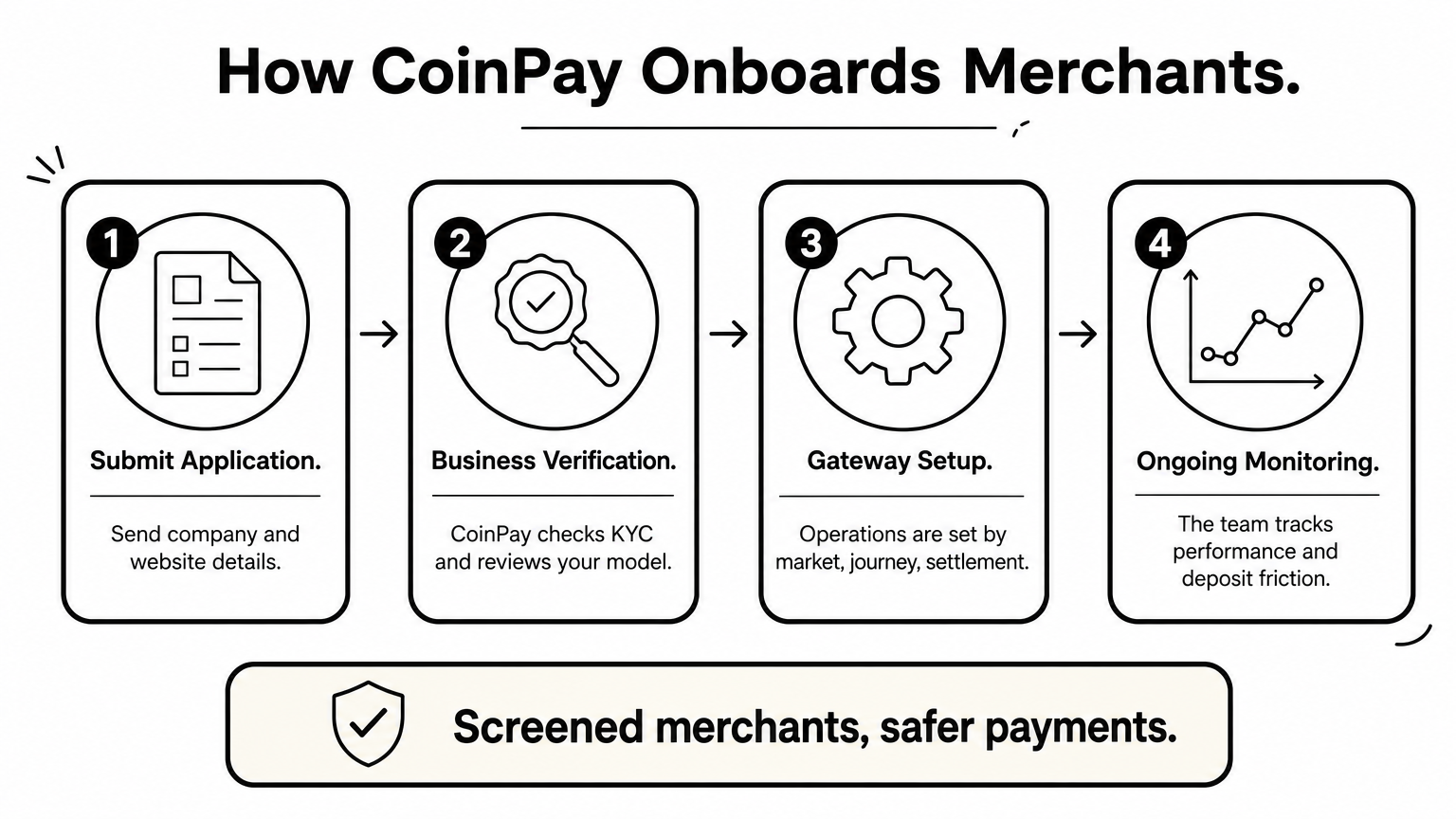
- You submit a business application with your company and website details.
- CoinPay verifies the business and reviews its model.
- Gateway operations are set up by market, payment journey, and settlement needs.
- The team monitors payment performance and works with you on deposit friction.
A gateway that screens its merchants carefully protects the merchants it approves.
Merchants often underestimate the last step. Five years of operating experience means the team has seen where deposit journeys break, and it will point to those spots instead of leaving you with an API key and a PDF.
Supported payment methods and settlement
Coverage is organized market by market. CoinPay serves Thailand, Vietnam, the Philippines, Malaysia, Bangladesh, India, and Indonesia. In Thailand, for example, it supports PromptPay with THB settlement. USDT payments run as a separate crypto and stablecoin service, so you can add them without changing your local-currency setup.
CoinPay does not publish one fixed method list for the Philippines, so confirm these points in your application:
- Which e-wallets, bank transfer, and over-the-counter methods are live for your use case
- The settlement currency and the payout schedule
- How refunds and failed payments are handled
- Whether you need USDT alongside local rails
Fees and pricing
There is no public rate card. Pricing is quoted after the merchant review, based on your market, expected volume, payment journey, and risk profile. That is a real drawback if you want to compare percentages on a spreadsheet today. It is also normal for a gateway that underwrites each merchant individually.
When you request a quote, ask for the all-in rate per method, any settlement or payout fees, and any reserve or holdback terms. Get these in writing, then compare them against the published rates of the self-serve gateways later in this list.
Best for
CoinPay suits established online businesses in e-commerce, gaming, fintech, and similar platforms that need local-currency settlement. It fits best if you operate in several Asian markets and want one partner who handles KYC, compliance questions, and ongoing support. Finance and operations teams that care about conversion on deposits, not just a working checkout, will get the most from it.
It is a poor fit if you want to sign up and go live in an afternoon with no review. It is also closed to scams, money-games, and deceptive schemes.
2. PayMongo
PayMongo is a Manila-based gateway built for developers and small online sellers. Many Filipino startups try it first, mostly because you can get started without a sales call.
How it works
You sign up online, upload your business documents, and get test API keys right away. After approval, you can accept payments through a hosted checkout, no-code payment links, or the API. Plugins are available for common platforms such as Shopify and WooCommerce, and the documentation is clear enough for a solo developer to follow.
PayMongo's real advantage is speed: you can build and test a checkout before the paperwork is finished.
That speed is the trade-off for a self-serve model. Support runs mostly through tickets and chat, so don't expect a dedicated account manager at low volumes.
Supported payment methods and settlement
Coverage focuses on the methods Filipino shoppers actually use. The list below reflects what PayMongo has offered, but availability changes, so check your dashboard.
| Category | Examples |
|---|---|
| Cards | Visa, Mastercard, JCB |
| E-wallets | GCash, Maya, GrabPay |
| Bank and QR | Online banking, QR Ph |
| Installments | BillEase |
Funds are paid out to a Philippine bank account in PHP. Payout timing varies by method and has historically taken several business days, so ask about it before you plan your cash flow.
Fees and pricing
There are no setup or monthly fees. You pay a percentage per successful transaction. Published rates have run at roughly 3.5% plus PHP 15 for cards and about 2% to 2.5% for e-wallets. Rates change and may differ by method, so treat these figures as a guide and confirm them on PayMongo's pricing page.
Watch the fixed per-transaction charge on cards. On a PHP 300 order, PHP 15 alone is 5% of the sale, so cards can get expensive for low-ticket items. Encouraging e-wallet payments at checkout can lower your blended cost.
Best for
PayMongo fits startups, small e-commerce shops, and freelancers who want a working checkout fast and have a developer or a simple platform plugin. It also suits you if your volume is modest and PHP-only settlement is fine.
Look elsewhere if you sell across several Asian markets, need USDT, or want hands-on help with deposit conversion. Merchants in higher-risk categories may also face closer review or a decline.
3. Xendit
Xendit is a payment infrastructure company that started in Indonesia and now operates in the Philippines, Indonesia, Vietnam, Thailand, and Malaysia. Among the self-serve gateways in this list, it offers some of the broadest method coverage and the strongest tooling for platforms.
How it works
You register online, submit your business documents, and wait for review before going live. After approval, you integrate through the API, a hosted invoice page, or payment links. Xendit also handles payouts and disbursements, which matters if you run a marketplace, pay out sellers, or send refunds in bulk.
Xendit is at its best when you need to send money out as well as collect it.
Expect more integration work than a simple plugin checkout. Support is better for larger accounts, while small merchants mostly rely on chat and email.
Supported payment methods and settlement
Xendit's Philippine coverage spans most of what local shoppers use. Confirm the live list for your account, since methods are enabled per merchant.
| Category | Examples |
|---|---|
| Cards | Visa, Mastercard, JCB |
| E-wallets | GCash, Maya, GrabPay, ShopeePay |
| Direct debit | Online banking from major Philippine banks |
| Over-the-counter | 7-Eleven and other retail outlets |
| QR and pay later | QR Ph, BillEase, Cashalo |
Funds settle in PHP to a local bank account. Timing depends on the method, and cards usually take longer than e-wallets. Ask for the settlement schedule per method before you forecast cash flow.
Fees and pricing
There is no setup fee or monthly fee for standard accounts. You pay per successful transaction. Published rates have run roughly 3% to 3.5% plus a fixed fee for cards, around 2% for e-wallets, and a flat peso amount for bank and over-the-counter payments. Payouts carry their own flat fee per transfer. These are guides, not quotes, so check the current pricing page.
Higher volume changes the math. Xendit offers custom pricing to larger merchants, so once you pass a steady monthly volume, ask for a negotiated rate instead of staying on the public one.
Best for
Xendit fits growing e-commerce brands, marketplaces, and subscription businesses that want many payment methods through one API. It also suits you if you plan to expand into Indonesia, Vietnam, Thailand, or Malaysia and want a single integration style across markets.
Skip it if you are a tiny shop that only needs a payment link, since lighter tools will be quicker to set up. Merchants who want hands-on help with deposit friction or USDT should also look at other options on this list.
4. Dragonpay
Dragonpay is a Philippine gateway built for shoppers who don't use cards. Local merchants use it for bank transfers and cash payments, which still make up a big share of online orders in the country.
How it works
You apply on Dragonpay's merchant signup page, submit your business documents, and get a test environment. Integration is redirect-based. Your checkout sends the customer to Dragonpay, they choose a channel, and Dragonpay posts the result back to your server. It is simple to build, but it offers less customization than the API-first tools above, and the merchant dashboard feels dated. Support runs mostly through email.
Dragonpay's strength is reach: it connects you to buyers who pay with bank accounts and cash.
Supported payment methods and settlement
The channel list leans toward bank and retail payments. Availability varies by merchant, so confirm what your account will get.
| Category | Examples |
|---|---|
| Online banking | Major Philippine banks |
| Over-the-counter banks | Branch deposits and ATM payments |
| Retail and bills payment | 7-Eleven, Bayad Center, ECPay, Cebuana Lhuillier |
| E-wallets | GCash, Maya |
| Cards | Offered, but not the focus |
Customers get a payment reference with an expiry date, then pay at the bank or store. Funds settle in PHP to your bank account. Timing depends on the channel, and cash payments only count once the outlet confirms them, so reconciliation takes longer than with card or wallet payments.
Fees and pricing
Most channels carry a flat peso fee per transaction instead of a percentage. Historically that has been a few tens of pesos, and some channels pass the fee to the customer. Rates differ by channel, so request the current schedule.
Flat fees reward big baskets. PHP 25 on a PHP 5,000 order is 0.5%. The same PHP 25 on a PHP 200 order is 12.5%. If your average order value is low, run the numbers before you commit.
Best for
Dragonpay suits merchants with higher-ticket or bill-style payments, such as travel, tuition, insurance, lending, and utilities. It also helps if many of your buyers are unbanked or prefer to pay in cash.
Pass if you want a modern developer experience, recurring billing, or a single partner across several countries. It also has no USDT option, and it offers little help with deposit-journey optimization.
5. Maya Business
Maya Business is the merchant side of Maya, the Philippine fintech formerly known as PayMaya. It bundles online payments, in-store acceptance, and business banking under one roof, which makes it more than a pure payment gateway.
How it works
You apply through Maya Business, submit your company documents, and get access to a merchant dashboard for transactions and settlements. Online, you accept payments through Maya Checkout, using the API, a platform plugin, or payment links. Because Maya owns its wallet, wallet payments are tightly integrated, and customers approve the charge in the Maya app.
Maya's edge is that it owns the wallet, so its own users get a smooth, familiar checkout.
Expect a review process closer to a bank's than a startup's. Approval can take longer than at self-serve tools like PayMongo, and support quality varies by account size.
Supported payment methods and settlement
Coverage centers on Maya's own ecosystem plus cards and QR. The table reflects what Maya has offered, but methods are enabled per merchant, so confirm your list.
| Category | Examples |
|---|---|
| Cards | Visa, Mastercard |
| E-wallet | Maya wallet |
| QR | QR Ph, which many bank and wallet apps can scan |
| In person | Card terminals and QR for physical stores |
Funds settle in PHP, either to a bank account or to a Maya business account. Timing differs by method, so ask for the schedule per method before you plan cash flow. Maya's coverage of over-the-counter cash payments is thinner than Dragonpay's.
Fees and pricing
Pricing is per transaction, with no large upfront cost for standard accounts. Published rates for online cards have run around 3.5% plus a fixed peso fee, with lower rates for wallet and QR payments. These figures change, and larger merchants can often negotiate, so request the current schedule in writing.
Also ask about the extras. Terminal rental, payout fees, and any rolling reserve can change your real cost more than the headline percentage does.
Best for
Maya Business suits merchants with both online and physical sales, such as restaurants, retail chains, and service businesses that want one provider for checkout, terminals, and settlement. It also helps if a large share of your customers already hold Maya wallets.
It is a weaker fit if you sell across several Asian markets, need USDT, or want hands-on help with deposit-journey optimization. Those merchants should look at the multi-market options in this list.
6. GCash for Business
GCash is the Philippines' largest e-wallet, run by Mynt, and most of your shoppers already have it installed. GCash for Business is the merchant program that lets you accept those payments directly, instead of only through a third-party gateway. It is a wallet acceptance product, not a full gateway.
How it works
You apply through GCash for Business, submit your registration documents, and wait for approval. Direct online integration is usually offered to established merchants. Smaller sellers often reach GCash through gateways like PayMongo, Xendit, or Dragonpay. In stores, customers pay by scanning a GCash QR code from the app.
GCash gives you the most popular wallet in the country, but not a complete checkout.
Think of it as one payment method with its own contract. It does not bundle cards, bank transfers, and cash into a single integration, so you will likely pair it with another provider if you want those.
Supported payment methods and settlement
Coverage is narrow by design. Customers pay from their GCash balance, and they can fund that balance from linked banks, cards, or cash-in outlets. Funds settle in PHP, and the payout timing depends on your agreement.
| Channel | How it works |
|---|---|
| GCash wallet | Customer approves the charge in the app |
| In-store QR | Customer scans your code at the counter |
| Online checkout | Offered directly to approved merchants, or through partner gateways |
Fees and pricing
Published merchant rates for wallet payments have sat in the low single digits, often near 2%. GCash prices by merchant category and volume, though, so get a written quote. Also ask about settlement fees and any reserve terms before you sign.
Compare that against the gateway route. If you take GCash through PayMongo or Xendit, you pay that gateway's e-wallet rate, usually about 2% to 2.5%, and you get other methods under one contract. A direct deal can be cheaper at scale, but only if GCash is a big share of your sales.
Best for
Retailers, restaurants, and service businesses with heavy GCash usage get the most from it, especially when they sell in person and online. It also suits you if you already run another gateway for cards and bank payments and want a direct, lower-cost wallet channel alongside it.
Skip it as your only payment option. It will not cover cash, cards, or bank transfers, and it offers nothing outside the Philippines. If you need multi-market settlement, USDT, or help improving deposit journeys, look at the other options on this list.
7. PayPal
PayPal is the one global name on this list, and it solves a different problem than the others. In the Philippines it works mainly as a cross-border payment tool, so it matters if your buyers live abroad, not if they shop from Cebu or Davao.
How it works
You open a PayPal Business account, verify your identity and bank details, and can start taking payments within days. You accept money through Checkout buttons, invoices, payment links, or plugins for Shopify and WooCommerce. Setup is fast and well documented, and PayPal's buyer protection reassures overseas customers who have never heard of your shop.
PayPal sells trust to foreign buyers, not convenience to local ones.
Local use has limits. PayPal has historically restricted domestic payments between Philippine accounts, and most local shoppers prefer GCash, Maya, or bank transfer. Check PayPal's current Philippines rules before you build a local checkout around it.
Supported payment methods and settlement
Buyers pay with what they have linked in their own country. For a Philippine merchant, that usually means foreign customers.
| Method | What to expect |
|---|---|
| PayPal balance | Common among international buyers |
| Cards | Linked to the buyer's PayPal account, mostly foreign |
| Bank accounts | Linked in the buyer's country |
| Local Philippine methods | Not the focus, so confirm before relying on them |
Funds land in your PayPal balance first, often in USD or another foreign currency. You then withdraw to a Philippine bank account in PHP. New accounts may see holds or limits, and withdrawals can carry a fee, so ask what applies to you.
Fees and pricing
There is no monthly fee for standard accounts. You pay a percentage plus a fixed fee on each commercial transaction, and international payments cost more than domestic ones. Published rates for Philippine sellers have run around 4% to 4.5% plus a fixed amount, though they change.
The bigger cost is often currency conversion. PayPal adds a spread when it converts foreign currency to PHP. On a USD 100 sale, the fee plus the spread could plausibly approach 7% to 8% of the order. Treat that as an illustration, then check PayPal's fee page and your own conversion options.
Best for
PayPal suits freelancers, exporters, and digital sellers whose customers sit mostly in the US, Europe, or Australia. It also works as a quick way to accept a first international payment without a sales process.
Look elsewhere if your buyers are Filipino, your order values are small, or you sell across several Asian markets. It offers no cash or over-the-counter channels, no USDT, and little help with deposit-journey optimization.
8. 2C2P
2C2P is a payment company founded in Thailand that now serves merchants across Southeast Asia. It is the most enterprise-oriented gateway on this list after CoinPay. It is built for businesses that sell in several countries, not only in the Philippines.
How it works
You contact the sales team, go through business review, and receive integration access once approved. Options include a hosted payment page, a direct API, and mobile SDKs, plus plugins for common e-commerce platforms. Tokenization, recurring billing, and fraud screening are aimed at larger merchants.
2C2P is built for merchants who sell across Southeast Asia, not just in Manila.
Expect a sales-led process. There is no instant signup, so onboarding takes longer than at PayMongo, and smaller merchants may find it heavy.
Supported payment methods and settlement
Philippine coverage has included cards, major e-wallets, bank payments, and cash channels. Methods are enabled per merchant, so confirm your exact list before you commit.
| Category | Examples |
|---|---|
| Cards | Visa, Mastercard, JCB |
| E-wallets | GCash, Maya, GrabPay |
| Bank payments | Online banking and transfers |
| Over-the-counter | Retail and bill payment outlets |
Settlement can be in PHP or, depending on your setup, in another currency. That helps if you report in USD or SGD. Ask for the settlement timing per method and any conversion charges on cross-border payouts.
Fees and pricing
There is no public rate card. Pricing is negotiated per merchant, based on volume, method mix, and the markets you serve. High volume across several countries gives you leverage. A small Philippine-only shop usually does not.
When you request a quote, ask about setup fees, minimum monthly commitments, per-method rates, and any reserve terms. Put every item in writing so you can compare it against the published rates of PayMongo and Xendit.
Best for
2C2P suits mid-size and large merchants in travel, e-commerce, subscriptions, and digital services that want one provider across several Southeast Asian markets. It also fits teams with developers who can handle a fuller integration.
Look elsewhere if you are a startup that needs to go live this week. USDT is also not a focus, so if you want crypto payments or hands-on help with deposit friction, check the other options on this list.
How to choose a payment gateway in the Philippines
Eight options is a lot to weigh, so narrow the list with a few practical questions. If you are working from an old payment gateway Philippines 2021 shortlist, rebuild it with current rates and method lists before you commit to anything.
Start with your buyers and basket size
Look at how your customers actually pay. If most use wallets, GCash and Maya coverage is non-negotiable. If many are unbanked or prefer cash, you need over-the-counter channels, which Dragonpay and Xendit handle well.
Then check your average order value. Fixed per-transaction fees hit small baskets hard, as the PayMongo and Dragonpay examples above showed. Percentage-only pricing is safer for low-ticket items, while flat fees favor large orders.
Your buyers' habits and your order value decide the right gateway faster than any feature list.
Match the gateway to your stage
Use this table as a first filter, then request quotes from two or three providers.
| Your situation | Start with |
|---|---|
| Startup that needs to launch fast | PayMongo |
| Marketplace with payouts and many methods | Xendit |
| Cash and bank payers, higher-ticket orders | Dragonpay |
| Online and in-store sales | Maya Business |
| Overseas buyers | PayPal |
| Enterprise selling across Southeast Asia | 2C2P |
| Multi-market merchant who wants KYC help, USDT, and hands-on support | CoinPay |
Check the terms before you sign
Before you pick a winner, put every quote on the same sheet. Headline rates rarely tell the full story, so ask each provider about:
- Settlement timing for each payment method
- Fixed fees versus percentage fees
- Payout fees and minimum monthly commitments
- Rolling reserves or holdbacks
- Refund and failed-payment handling
- Support channels and response times
Finally, test the numbers. Take last month's real orders and price them through each quote. The cheapest gateway on paper is often not the cheapest for your mix of cards, wallets, and cash.
Picking the right gateway for your business
There is no single best payment gateway in the Philippines. The right pick follows your buyers, your order values, and the markets you sell in. PayMongo gets startups live fast, Xendit covers broad methods and payouts, Dragonpay reaches cash payers, and PayPal serves overseas buyers.
Before you decide, put real quotes on one sheet and price last month's orders through each one. Settlement timing, reserves, and fixed fees often matter more than the headline rate, and older rate lists go stale quickly.
If you sell across several Asian markets and want a partner for KYC, USDT, and ongoing support, CoinPay is built for that. Book a demo call with our team and we will walk through your payment journey with you.