
WooCommerce Payment Gateway India: 7 Best Options Compared
Picking a payment gateway for WooCommerce in India looks simple until you compare the details. Fees vary by payment mode, settlement times range from T+1 to T+3, and not every plugin handles UPI, cards, netbanking and wallets equally well. A wrong choice shows up later as failed payments, abandoned carts and reconciliation headaches.
If you want the short answer, the best WooCommerce payment gateway in India depends on your volume, your average order value and how much support you need. Razorpay suits fast setup, PayU suits broad payment coverage, Cashfree is strong on quick settlements, and PhonePe is worth a look if UPI drives most of your sales.
Below, we compare seven gateways side by side: transaction fees, supported payment modes, onboarding requirements and how hard the WooCommerce plugin is to set up, drawn from the wider list of payment gateway companies in India. At CoinPay, we have spent five years helping merchants across South and Southeast Asia, India included, so we also flag what to check around KYC, compliance and payment performance before you commit.
1. CoinPay
Overview and how it works with WooCommerce
CoinPay is a merchant-focused payment partner, not a self-serve checkout plugin. For a payment gateway WooCommerce India setup, you apply first. The team then runs its merchant review, KYC and compliance checks before anything goes live.
Integration is scoped with your account team after approval. Confirm the connection method, plugin or API, for your WooCommerce version during onboarding, and run test deposits on a staging site before launch.
CoinPay is a payment partner you onboard with, not a plugin you install in five minutes.
Payment methods and coverage
Payments run market by market, with local methods and local-currency settlement. Thailand's PromptPay with THB settlement is one example. Ask which India payment methods, from UPI to net banking and IMPS, are enabled for your business category, since availability depends on your model.
- Markets: India, Thailand, Vietnam, the Philippines, Malaysia, Bangladesh and Indonesia
- Crypto: a separate USDT deposit and payout service for stablecoin deposits
- Support: hands-on help after integration, not only during setup
Fees and settlement
Rates depend on your market, payment journey and settlement needs, so expect a quote instead of a public rate card. That makes comparison harder, but it also means pricing reflects your actual business.
| Item | How CoinPay handles it |
|---|---|
| Pricing | Quoted per merchant after review |
| Settlement | Set by market and settlement needs |
| Onboarding | Application, verification, due diligence |
Who it is best for
Choose CoinPay if you run a legitimate business that needs compliant, long-term payment infrastructure and a team that answers when something breaks. It is the best WooCommerce payment gateway in India for merchants who value support over speed of signup.
- E-commerce, gaming, fintech and other online platforms
- Merchants expanding across several Asian markets
- Teams that want help reducing payment friction and tracking success rates per payment method
Pros and limitations
Weigh the trade-offs honestly. CoinPay offers five years of operating experience and strict screening, which protects you from risky processor neighbors.
- Pro: hands-on support and deposit journey improvements
- Pro: regional coverage plus a USDT option
- Limitation: no instant self-signup, since review takes time
- Limitation: pricing is not published, and scam, money-game or deceptive businesses are rejected
2. Razorpay
Overview and how it works with WooCommerce
Razorpay is the default pick for many Indian stores. Its official plugin, Razorpay for WooCommerce, installs from the WordPress plugin directory. You paste your API Key ID and Secret from the dashboard, add a webhook, and Razorpay appears at checkout right away. Most stores finish setup in under an hour once the account is activated.
Razorpay is the quickest route from plugin install to first live order for most Indian WooCommerce stores.
Activation needs business KYC, usually PAN, bank details and GST information where applicable. Test mode works while you wait.
Payment methods and coverage
Any payment gateway WooCommerce India shoppers expect must handle UPI, cards, netbanking and wallets. Razorpay does, and it adds EMI and pay-later options. International cards and multi-currency need separate activation.
- UPI intent, collect and QR
- Credit and debit cards, including RuPay
- Netbanking across major Indian banks
- Subscriptions through WooCommerce Subscriptions
Fees and settlement
Razorpay lists no setup or annual fee. You pay per transaction, and rates change by plan and payment mode, so check the current rate card and see how MDR, GST and hidden charges add up in India before you sign.
| Item | Typical detail |
|---|---|
| Domestic payments | About 2% plus GST |
| International cards | About 3% plus GST |
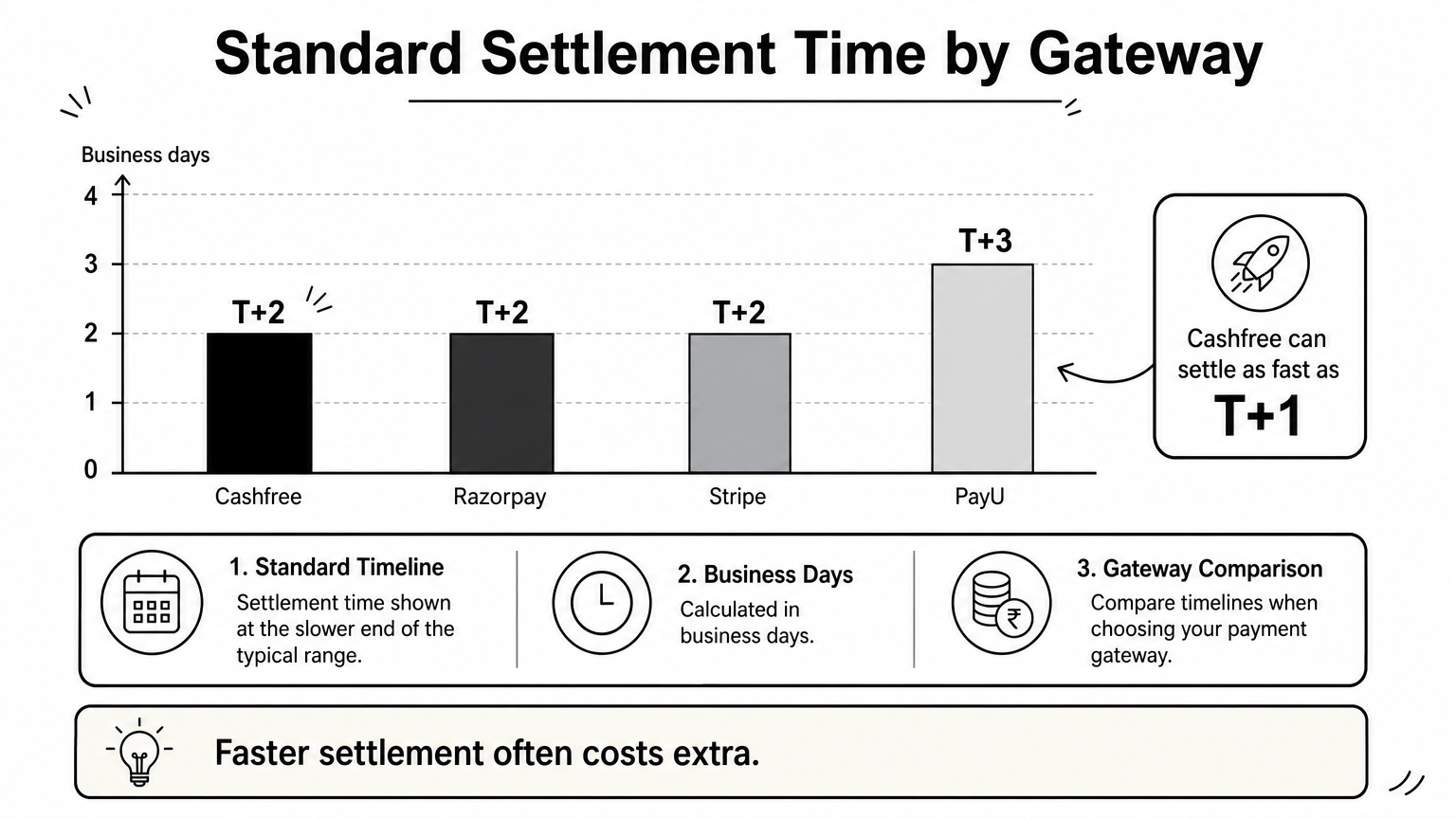
| Standard settlement | T+2 business days |
| Faster settlement | Available at extra cost |
Who it is best for
Pick Razorpay if you want a quick launch and a familiar checkout. It fits small and mid-size D2C stores, and it also works for stores that sell subscriptions.
- New stores with no developer on staff
- Merchants who need UPI plus cards from day one
- Teams that want clear docs and an active dashboard
Pros and limitations
The strengths are easy setup and wide payment coverage. The trade-offs show up later, as volume grows.
- Pro: official plugin and strong documentation
- Pro: full mix of Indian payment modes
- Limitation: standard rates are not the lowest, so negotiate at higher volume
- Limitation: accounts can be held for review if your business category looks risky
3. PayU
Overview and how it works with WooCommerce
PayU is one of the oldest names in Indian online payments. It offers an official WooCommerce plugin that installs from the WordPress plugin directory. You enter the merchant key and salt from your PayU dashboard, enable the gateway, and test in sandbox mode. Live access follows KYC approval, which usually means PAN, GST details and bank proof.
PayU's edge is breadth of payment options and bank connections, not the fastest signup.
Plan for a short testing round on success and failure return URLs before you go live.
Payment methods and coverage
PayU covers the standard Indian mix, so it works as a payment gateway for WooCommerce in India without extra add-ons. It also supports EMI and pay-later options, plus international cards on request.
- UPI, including intent and QR
- Credit and debit cards, including RuPay
- Netbanking and major wallets
- EMI and buy-now-pay-later
Fees and settlement
PayU typically charges no setup fee and bills per transaction. Rates vary by payment mode and volume, so ask for the current rate card and negotiate once you pass steady monthly volume.
| Item | Typical detail |
|---|---|
| Domestic payments | About 2% plus GST |
| International cards | Higher, quoted on request |
| Standard settlement | T+2 to T+3 business days |
Who it is best for
PayU suits mid-size and growing stores that want many payment modes and room to negotiate. Some merchants rank it among the best WooCommerce payment gateway India options for high-volume catalogs where success rates matter more than setup speed.
- Stores with EMI-heavy, higher-ticket products
- Merchants selling to international buyers
- Teams ready to negotiate custom pricing
Pros and limitations
PayU gives you broad coverage and a long track record. The friction sits mostly in onboarding and plugin configuration.
- Pro: wide payment mode and EMI coverage
- Pro: established brand with bank relationships
- Limitation: onboarding and activation can take longer
- Limitation: dashboard and plugin feel less polished than newer rivals
4. Cashfree
Overview and how it works with WooCommerce
Cashfree Payments is the pick when settlement speed is your priority. Its official WooCommerce plugin installs from the WordPress plugin directory. You paste your App ID and Secret Key from the dashboard, choose test or production mode, and save. Live access follows KYC, usually PAN, bank proof and business documents.
Cashfree's strongest selling point is how quickly your money reaches your bank account.
Payment methods and coverage
You get UPI, cards, netbanking and wallets, plus pay-later and EMI options. Cashfree also offers payment links, which helps if you take orders over WhatsApp or email as well as on your store. International cards need separate activation.
- UPI intent, collect and QR
- Credit and debit cards, including RuPay
- Netbanking and major wallets
- Pay later and EMI
Fees and settlement
Cashfree typically charges no setup fee on standard plans and bills per transaction. Rates change, so confirm the current rate card before you sign.
| Item | Typical detail |
|---|---|
| Domestic payments | Roughly 2% plus GST, varies by mode |
| International cards | Higher, quoted on request |
| Standard settlement | T+1 to T+2 business days |
| Instant settlement | Available, usually at extra cost |
Who it is best for
Stores with high daily order volume or thin working capital benefit most. Faster payouts let you restock sooner. Marketplaces that split payments between vendors should also look at Cashfree, since it is one of the best WooCommerce payment gateway India options for payout-heavy models.
- Fast-moving D2C and subscription stores
- Multi-vendor marketplaces
- Teams with a developer who will use the API
Pros and limitations
Cashfree gives you quick settlements and a clean dashboard. The plugin is simpler than some rivals, so advanced checkout customization may need custom code.
- Pro: fast payouts and instant settlement option
- Pro: strong API and payout tools
- Limitation: fewer plugin features than Razorpay
- Limitation: support quality can vary on lower-volume accounts
5. PhonePe Payment Gateway
Overview and how it works with WooCommerce
PhonePe Payment Gateway is the business arm of India's largest UPI app. You apply with PAN, GST details and bank proof, then add your merchant credentials to the PhonePe plugin for WooCommerce. Setup fields have changed between API versions, so follow the current developer docs and test in sandbox before taking live orders.
PhonePe makes the most sense when UPI, not cards, drives your checkout.
Payment methods and coverage
Expect UPI first, with cards, netbanking and wallets behind it. Customers who already use the PhonePe app get a familiar flow, which can help UPI completion. EMI and international card coverage is thinner than at Razorpay or PayU, so confirm what is enabled for your account.
- UPI intent, collect and QR
- Credit and debit cards
- Netbanking and wallets
Fees and settlement
Pricing is negotiated per merchant, and rules on UPI charges have shifted over time. Get your quote in writing and check which payment modes it covers.
| Item | Typical detail |
|---|---|
| UPI | Low or zero fee, confirm in your quote |
| Cards and netbanking | Percentage fee plus GST |
| Standard settlement | Usually T+1 to T+2 business days |
Who it is best for
Choose PhonePe if most of your buyers pay by UPI and your average order value is modest. It suits mobile-first stores selling groceries, fashion, digital goods or services. If you need heavy EMI or a wide international card mix, compare it against Razorpay or PayU first.
- Mobile-heavy D2C stores
- Low to mid-ticket catalogs
- Merchants who want a trusted UPI brand at checkout
Pros and limitations
PhonePe gives you strong UPI performance and a brand shoppers recognize. The trade-offs are plugin maturity and breadth of features.
- Pro: familiar UPI experience for PhonePe app users
- Pro: competitive UPI pricing for the right merchant profile
- Limitation: fewer payment modes and plugin options than larger rivals
- Limitation: onboarding approval can be selective for newer or high-risk businesses
6. Stripe
Overview and how it works with WooCommerce
Stripe is a global, developer-first processor. Its official WooCommerce Stripe Payment Gateway plugin installs from the WordPress plugin directory. You connect your account, copy the publishable and secret keys, and add a webhook. The catch for a payment gateway WooCommerce India setup is account access. New Indian businesses have often faced an invite or waitlist, so check current availability before you plan a launch around Stripe.
Stripe is excellent software, but for Indian merchants the first question is whether you can open an account.
Payment methods and coverage
Cards are where Stripe shines, especially international ones. Local coverage is narrower than at Razorpay or PayU, so confirm UPI, netbanking and wallet support for your account instead of assuming it.
- Credit and debit cards, plus Apple Pay and Google Pay
- Multi-currency charging for overseas buyers
- UPI and other local methods, subject to approval
- Subscriptions and invoicing tools
Fees and settlement
Stripe publishes simple per-transaction pricing, but India rates depend on your account type. Verify the current rate card and any extra charges for currency conversion.
| Item | Typical detail |
|---|---|
| Domestic cards | About 2% plus GST |
| International cards | About 3% plus GST |
| Settlement | Often T+2 or longer for new accounts |
Who it is best for
Stripe suits stores that sell to customers abroad or run subscriptions, and that have a developer on staff, though it is worth weighing against other international payment gateways available to Indian businesses. It is a weaker fit if most of your buyers pay by UPI and you want the fastest possible onboarding.
- Exporters and cross-border D2C brands
- SaaS and subscription businesses
- Teams that value clean APIs and documentation
Pros and limitations
Stripe gives you best-in-class developer tools and a smooth card checkout. The trade-offs are access and local depth.
- Pro: polished checkout and excellent documentation
- Pro: strong international card and currency support
- Limitation: account approval for Indian businesses can be restricted or slow
- Limitation: thinner Indian payment mode coverage than local rivals
7. PayPal
Overview and how it works with WooCommerce
PayPal works for Indian stores only when your buyers are overseas. It does not support domestic Indian transactions, so it sits beside a local gateway instead of replacing it. The official WooCommerce PayPal Payments plugin installs from the WordPress plugin directory. You click Connect, log in to a PayPal Business account and approve the permissions, so there are usually no keys to paste.
For an Indian store, PayPal is a cross-border add-on, never your main checkout.
Payment methods and coverage
Shoppers abroad pay with their PayPal balance, linked cards or local options that vary by country. UPI, netbanking and RuPay are not part of the picture, so confirm what your account can offer before you promise anything at checkout.
- PayPal wallet and linked bank accounts
- International credit and debit cards
- Pay Later offers in selected countries
- Multi-currency checkout for overseas buyers
Fees and settlement
PayPal pricing for Indian merchants is higher than local gateways, and currency conversion adds a margin on top. Check the current fee page for your account before you model your margins.
| Item | Typical detail |
|---|---|
| International payments | Roughly 4.4% plus a fixed fee |
| Currency conversion | Extra margin over the market rate |
| Settlement | Held in your balance, then withdrawn to an Indian bank in INR |
Who it is best for
Choose PayPal if you ship abroad and your customers trust it more than an unfamiliar card form. It suits exporters, handmade and craft sellers, and digital goods stores with a Western audience. If most orders come from Indian buyers, you can skip it and put your effort into a UPI-ready gateway instead.
Pros and limitations
PayPal gives you instant trust with international shoppers and a plugin that takes minutes to connect. The cost and the limited scope are what hold it back.
- Pro: a familiar, trusted checkout for overseas buyers
- Pro: simple plugin connection with buyer protection
- Limitation: no domestic Indian payments or UPI
- Limitation: high fees plus conversion margin, and export paperwork to keep
Choosing the right gateway for your store
The right payment gateway for WooCommerce in India comes down to three things: your payment mix, your order volume and how much support you need. Razorpay is the fastest to launch, PayU has the broadest coverage, Cashfree pays out quickest, and PhonePe is strongest when UPI drives your checkout. Stripe and PayPal make sense mainly when you sell abroad, and the same shortlist shifts again if you also run a Shopify store in India.
Start by checking your own numbers. Look at your share of UPI versus card orders and how fast you need cash in your bank. Then run test payments in sandbox before you commit, and compare current rate cards, since fees change.
If you run a legitimate business and want a partner that stays involved after integration, CoinPay is built for that. You can book a free demo call and talk to our payments team about your market, your payment journey and your settlement needs.