
WooCommerce Payment Gateway Philippines: 6 Options Compared
The best WooCommerce payment gateway Philippines merchants can pick depends on how your customers pay and how much paperwork you can handle. PayMongo suits most stores that want cards and e-wallets quickly. Maya Business suits registered businesses that want Maya's wallet natively. Xendit fits stores that need over-the-counter payments or plan to expand across Southeast Asia. HitPay fits stores chasing low GCash fees, PayPal fits overseas buyers, and CoinPay fits merchants who want a vetted, hands-on partner.
The problem is that WooCommerce's own processor, WooPayments, is not available to Philippine merchants. Your checkout stays empty until you connect a third-party gateway. Each one handles GCash, Maya and QR Ph differently, charges different fees and asks for different documents.
This guide compares six options on setup, payment methods, published fees and fit. CoinPay, our own service, comes first because it runs QR Ph and GCash flows for Philippine merchants. It is not the right choice for every store, and we say so below.
1. CoinPay: managed gateway with GCash and QR Ph
Setup and payment methods
CoinPay is a managed payment gateway service, not a plugin you install in five minutes. Merchants apply, pass business verification, and then receive the integration and testing information needed to connect checkout. For the Philippines, customers pay in PHP through two flows:
- Philippines GCash E-Wallet Deposit: customers select GCash and complete the payment through CoinPay's GCash e-wallet flow.
- Philippines QR Pay Deposit: customers select QR Pay and pay through the CoinPay QR PH flow.
Ask on your demo call how the flow connects to your WooCommerce checkout, because that depends on your store setup.
Fees and who it suits
Expect a structured application that may cover company information, ownership details, identity checks and business activity. CoinPay does not accept fraudulent or deceptive businesses, and it does not support pyramid, money-game or misleading investment models.
It suits established e-commerce, gaming and fintech merchants that want help with KYC, a monthly success-rate report and a contact reachable by email or Telegram. The team has five years of operating experience and also covers Thailand, Vietnam, Malaysia, Bangladesh, India and Indonesia. A small hobby store will get live faster with a self-serve plugin.
A managed gateway trades install speed for vetting, monitoring and a human contact.
2. PayMongo for simple card and wallet checkout
Setup and payment methods
PayMongo is a Philippine-built gateway with a dedicated plugin, "Payments via PayMongo for WooCommerce," on WordPress.org. The plugin needs WooCommerce 3.9.3 or above, and your store currency must be set to Philippine pesos. One account then activates several channels:
- Visa and Mastercard cards
- GCash, Maya and GrabPay wallets
- Online banking such as BPI and UnionBank, plus BillEase
Payouts typically arrive in two to three business days, according to third-party listings.
Fees and who it suits
There are no setup or monthly fees. Published figures vary by source and volume tier. One 2026 comparison lists about 2.23% for GCash and about 3.125% plus PHP 13.39 for domestic cards, while an older listing shows 3.5% plus PHP 15 for cards. Check PayMongo's current pricing before you decide.
It suits stores that want cards and the main wallets without a custom build. You still need business verification before going live, so start the application early. Over-the-counter payments are not listed in the comparisons we reviewed.
PayMongo is the low-friction default when cards and wallets are all you need.
3. Maya Business for Maya wallet customers
Setup and payment methods

Maya Business, the merchant arm of Maya (formerly PayMaya), offers a Maya Checkout plugin for WooCommerce. You install it from your WordPress dashboard, and a sandbox mode lets you test before going live. You need a Maya Business Manager account, which requires business registration documents.
- Credit and debit cards
- QR Ph
- The Maya wallet, supported natively
- GCash, listed as available in a 2026 comparison
Maya is regulated by the Bangko Sentral ng Pilipinas (BSP) and backed by Maya Bank.
Fees and who it suits
Pricing varies by payment method and business agreement. One 2026 comparison lists about 2% for GCash, 1.5% for the Maya wallet and 3.5% plus PHP 10 for cards. Treat these as indicative and ask Maya for a written quote.
It suits registered businesses whose customers already hold Maya wallets, and merchants who value BSP regulation and a single local provider. Sole traders without DTI or SEC papers will hit the onboarding wall first. Maya also covers fewer payment channels than Xendit, with no over-the-counter option listed.
Maya Business rewards merchants who already have their registration papers in order.
4. Xendit for over-the-counter and regional growth
Setup and payment methods
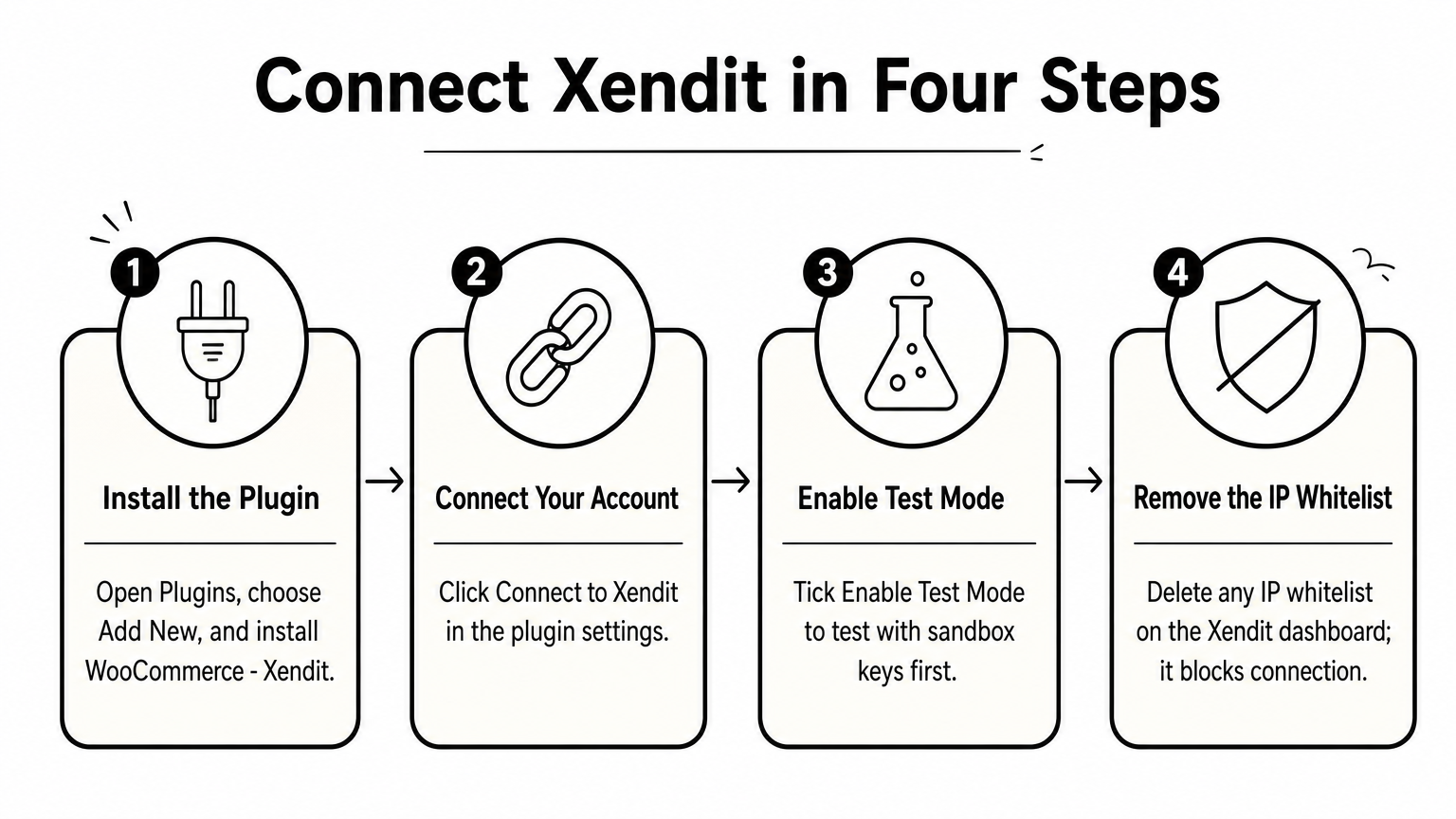
Xendit has an official plugin called "WooCommerce - Xendit." Your server needs WordPress 4.8.3, WooCommerce 3.1.2 and PHP 7.0 or above, with cURL and OpenSSL enabled. Install it under Plugins, then Add New, and click Connect to Xendit in the plugin settings. Tick Enable Test Mode to test with sandbox keys first. Remove any IP whitelist on your Xendit dashboard, because it blocks the connection.
- GCash, Maya and GrabPay
- Visa, Mastercard and QR Ph
- Over-the-counter payments at networks such as 7-Eleven, Cebuana Lhuillier and Palawan
Fees and who it suits
There are no setup, monthly or maintenance fees. Xendit's own 2026 comparison lists 3% plus PHP 11 for GCash, 2% plus PHP 11 for Maya and GrabPay, and 3.5% plus PHP 11 for domestic cards. Those per-payment fixed fees make it pricier on small orders. High-volume merchants can negotiate.
It suits shoppers who pay at a counter instead of by card, and brands that plan the same store for Indonesia, Malaysia, Thailand or Vietnam from one dashboard. If you only sell in the Philippines to wallet users, you will likely pay more than with other options here.
Choose Xendit when counter payments or multi-country growth matter more than the lowest fee.
5. HitPay for low GCash fees and BillEase
Setup and payment methods
HitPay is a Singapore-based gateway whose WooCommerce plugin installs from the WordPress dashboard with no coding. It supports GCash, QR Ph, GrabPay, BillEase and local bank transfers. BillEase matters if you sell higher-priced items, because buy now, pay later lowers the barrier to checkout.
One gap: the Maya wallet was not listed in the comparisons we reviewed. If many of your buyers use Maya, confirm support before you commit.
Fees and who it suits
There are no setup or monthly fees, only per-transaction charges. Two independent sources put GCash at about 2.3%. A 2026 comparison lists domestic cards at 3% plus PHP 15 and international cards at 4% plus PHP 15.
It suits wallet-heavy stores selling mid-priced and premium products, where a competitive GCash rate and BillEase installments help conversion. It is less suited to stores that need over-the-counter payments, which were not listed. Regional focus is mainly the Philippines and Singapore.
HitPay wins on GCash cost and installments, not on payment channel breadth.
6. PayPal for overseas buyers
Setup and payment methods
PayPal connects through the official PayPal Payments extension on WooCommerce.com. It accepts PayPal balances, cards and, in select regions, Pay Later. Its strength is trust: international shoppers who have never heard of GCash recognize the PayPal button instantly.
PayPal does not replace a local gateway. It does not give Filipino customers GCash or QR Ph, so use it alongside one of the gateways above.
Fees and who it suits
There are no setup or monthly fees on standard accounts. A third-party listing puts international transactions at about 4.4% plus a fixed fee, noticeably above local wallet rates. Check PayPal's current Philippines fee page before pricing your products.
It suits stores that sell to the Filipino diaspora or to international buyers of Filipino goods. If nearly all your customers live in the Philippines, PayPal adds cost without adding many sales.
Use PayPal as a second checkout button for foreign buyers, never as your only gateway.
How the fees compare and what to check before launch
Fees side by side
WooCommerce itself is free, so you pay only the gateway's per-transaction fees plus hosting. There is no WooCommerce surcharge for skipping WooPayments. The table shows indicative published rates, which change and vary by volume, so confirm each one before you commit.
| Gateway | GCash | Domestic cards | Over-the-counter | WooCommerce plugin |
|---|---|---|---|---|
| CoinPay | - | - | Not listed | Confirm on demo call |
| PayMongo | About 2.23% | About 3.125% + PHP 13.39 | Not listed | Yes, WordPress.org |
| Maya Business | About 2% | 3.5% + PHP 10 | Not listed | Maya Checkout |
| Xendit | 3% + PHP 11 | 3.5% + PHP 11 | Yes | Official plugin |
| HitPay | About 2.3% | 3% + PHP 15 | Not listed | Yes |
| PayPal | Not supported | About 4.4% + fixed (international) | Not supported | PayPal Payments |
Take a PHP 1,500 GCash order. Maya's 2% costs PHP 30, PayMongo's 2.23% costs PHP 33.45, HitPay's 2.3% costs PHP 34.50, and Xendit's 3% plus PHP 11 costs PHP 56. At 400 such orders a month, that spread is PHP 12,000 versus PHP 22,400 in fees.
Checks before you go live
A gateway that looks cheap on paper can stall at onboarding, so run through this list first:
- Gather your business documents, such as DTI or SEC registration, before you apply.
- Set your WooCommerce store currency to PHP.
- Test every payment method in sandbox or test mode, including a failed payment.
- Confirm the payout schedule so you can plan cash flow.
- Keep a second method available, so a customer whose card declines can switch to GCash.
Compare gateways on fee per order and on approval time, because a delayed launch costs sales too.
Choosing your gateway
For most Philippine WooCommerce stores, the shortlist is PayMongo, Maya Business, Xendit and HitPay, chosen by which payment methods your customers actually use. Add PayPal only if you sell abroad. Whatever you pick, test GCash and QR Ph end to end before launch.
If you run an established business and want vetting, monthly success-rate monitoring and hands-on support, CoinPay is built for that. You can set up a free demo call with CoinPay to see how its GCash and QR PH flows would connect to your store.