
5 Best WooCommerce Payment Gateways for Thailand in 2026
The best WooCommerce payment gateway in Thailand is the one that matches how your customers actually pay. Opn Payments and Pay Solutions suit Thai shops that want PromptPay, cards and wallets in one checkout. Stripe suits stores with overseas buyers and some technical help. PayPal works as a second option for foreign shoppers. CoinPay suits approved merchants who want a managed PromptPay and bank transfer setup with hands-on support.
Thai shoppers rarely pay by card alone. They scan a PromptPay QR code, pay from a banking app or use a wallet such as TrueMoney. A gateway that only takes cards loses those orders, and a gateway with high fees eats the margin on the orders it keeps. WooCommerce has no built-in Thai payment method, so you have to pick one and connect it yourself.
This article ranks five options on local method coverage, published fees, the WooCommerce connection and who each one fits. It then shows how to compare them and set one up. CoinPay is our own service, so it comes first, and I say plainly where it differs from plug-and-play plugins. Fee figures come from provider and third-party sources, so confirm current rates before you sign.
1. CoinPay
CoinPay is a managed payment gateway for approved merchants, not a plugin you install in five minutes. It handles PromptPay and bank transfer deposits for Thai customers, and every merchant goes through a review before processing starts.
Methods and setup
Onboarding runs through an application, business verification and service setup before you take a single payment. Approved merchants then receive the information needed for integration and testing. Ask during onboarding how the connection to your WooCommerce checkout will work, so you know the route before you commit.
| Service | Whole process | Submit to deposit complete |
|---|---|---|
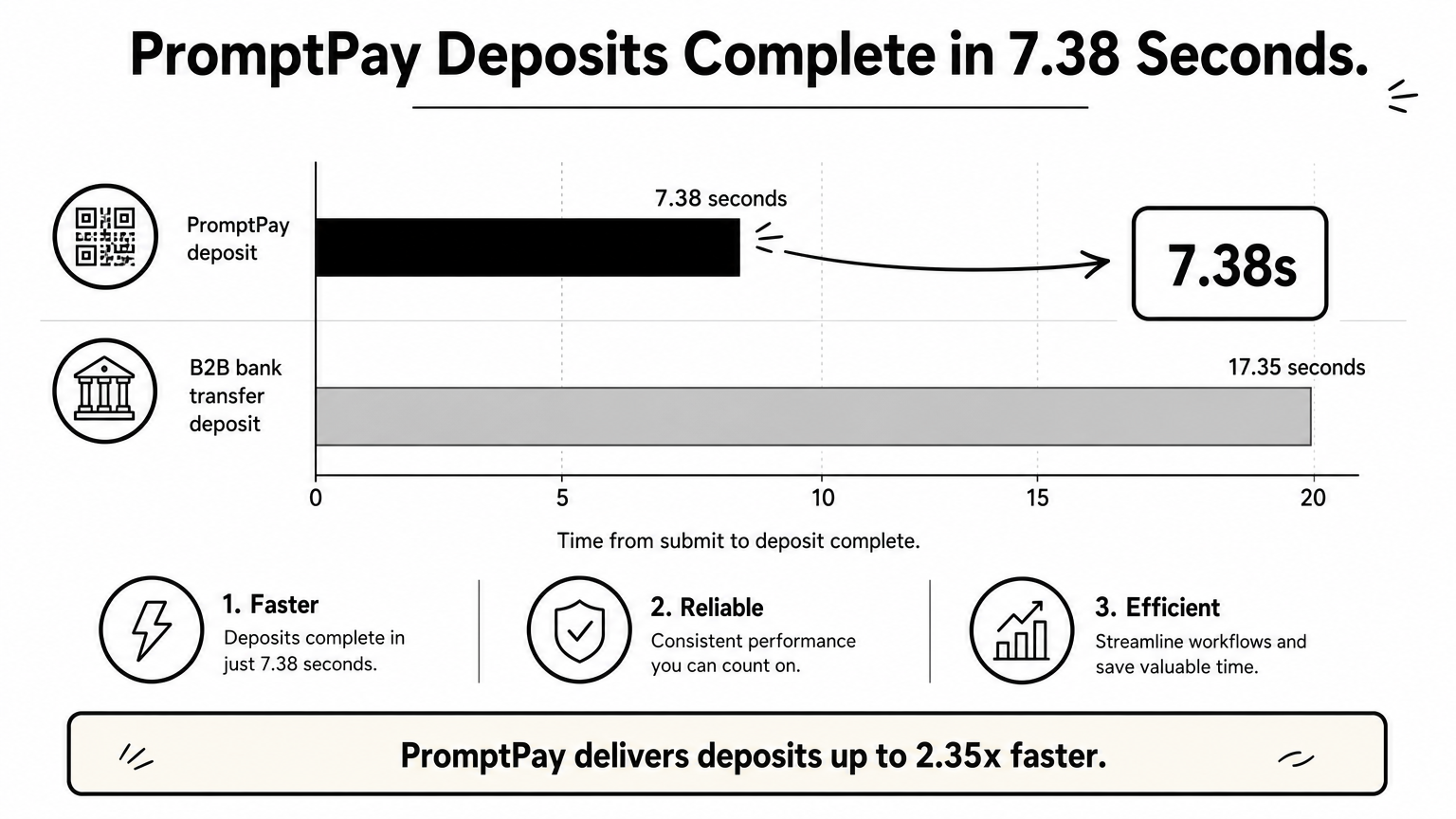
| PromptPay deposit | 13.28s | 7.38s |
| B2B Bank Transfer deposit | 23.25s | 17.35s |
Bank transfer payouts average 1 to 3 minutes, which helps when you handle refunds or customer withdrawals. USDT deposits and payouts run as separate services.
A PromptPay deposit completes about 7 seconds after the customer submits it, and that is the speed buyers notice at checkout.
Fees and best fit
Ask about pricing on the demo call and compare it with the per-method rates in the next sections. The merchant review can cover company information, ownership details and identity checks. CoinPay rejects scams, money-game schemes and misleading investment models.
CoinPay fits legitimate merchants, such as e-commerce, gaming or fintech stores that want a human contact. It has five years of operating experience and produces monthly success-rate monitoring for its merchants. It is a poor fit if you need to go live today with no review.
2. Opn Payments
Opn Payments, formerly Omise, is the most complete plug-in option for Thai local payment methods in WooCommerce. A WooCommerce plugin is available, and one integration covers cards, PromptPay, banking apps and wallets.
Methods and setup
You connect the plugin to your Opn account and enable the methods you want. Customers can pay with:
- Visa, Mastercard, JCB and American Express cards
- PromptPay QR codes
- Mobile banking such as K PLUS and SCB Easy
- Internet banking from major banks
- Wallets including Rabbit LINE Pay, Google Pay, TrueMoney Wallet, Alipay and WeChat Pay
Multi-currency payments exist, but you may need to ask Opn to activate them, and they apply only to Visa and Mastercard.
If your buyers mix PromptPay, banking apps and wallets, Opn covers all of them with one plugin.
Fees and best fit
Published rates, before 7% VAT, are THB 10 for mobile banking, 1.65% for PromptPay, 2.65% for TrueMoney Wallet, and 3.65% for cards, Google Pay, internet banking and Rabbit LINE Pay. On a THB 1,000 order, PromptPay costs about THB 17.66 including VAT, and a card costs about THB 39. Moving money to your bank costs THB 30 for transfers up to THB 2 million.
Opn suits Thai SMEs that want broad coverage without stitching several plugins together. The 3.65% card rate is on the high side, but Opn says you can request a lower rate based on volume, basket size and risk.
3. Pay Solutions
Pay Solutions is the cheapest published option for PromptPay among the local gateways here. It is a Thai provider, formerly Thaiepay, with more than 17 years in the market, and it works with WooCommerce.

Methods and setup
It accepts cards including UnionPay, PromptPay QR, mobile and internet banking, TrueMoney Wallet, Alipay and WeChat Pay. Its installment payment options run through Kasikorn Bank, SCB, Bangkok Bank, KTC, Krungsri and other issuers. That helps if you sell higher-priced items.
Extras include payment links, SMS links, a sub-store feature for multiple branches and e-tax service. Confirm the exact WooCommerce module and version on the provider's site before you build around it.
For PromptPay-heavy stores, a 1% rate beats most gateways on this list.
Fees and best fit
Rates before 7% VAT are 3% for cards and banking, 1% for PromptPay, 2% for TrueMoney and Alipay, 3% for international QR (conditions apply) and 5.5% for PayPal. A THB 1,000 PromptPay order costs THB 10.70 with VAT, and a card order costs THB 32.10. Refunds on payments older than 7 days cost THB 300, and bank transfers cost THB 12 to 20.
Pay Solutions suits small and mid-sized Thai shops that sell mostly to local buyers. It is less convincing for stores that depend on foreign cardholders or heavy cross-border sales.
4. Stripe
Stripe is the fastest route to cards and PromptPay if you want an official, free WooCommerce plugin. It is developer-friendly and suits stores that sell to both Thai and overseas buyers.

Methods and setup
Stripe supports Visa, Mastercard, American Express, JCB and Discover, plus PromptPay QR, Google Pay and Apple Pay. You install the official Stripe plugin, paste in your API keys and switch on the methods you need. Check Stripe's eligibility rules for your business type and registration before you start.
Built-in fraud tools (Stripe Radar) add protection without extra plugins. Local wallet coverage is thinner than at Opn or Pay Solutions, so TrueMoney buyers may not find their method.
Stripe is the right pick when your buyers use cards and PromptPay, and wallets are not a priority.
Fees and best fit
Stripe charges a percentage per successful transaction plus a fixed THB 11 fee, and adds 2% for currency conversion. The fixed fee hurts on small baskets: on a THB 200 order, THB 11 is 5.5% before the percentage. Check Stripe's current Thailand pricing page for the exact rate by method.
It fits stores with international customers, subscriptions or a developer who wants control over the checkout. It fits less well if most of your revenue comes from Thai wallets and banking apps.
5. PayPal
PayPal is best as a second option for overseas buyers, not your main gateway in Thailand. Fees are higher than local gateways, but foreign customers trust it.
Methods and setup
PayPal offers an official WooCommerce extension that adds PayPal checkout and card payments. Customers pay by PayPal balance, bank account or Visa, Mastercard, Discover and American Express cards. PayPal returned to Thailand in 2021 as PayPal (Thailand), and business account approval needs a Thai business registration document, proof of business address and a legal representative's ID.
It does not cover PromptPay or Thai wallets, so pair it with one of the local gateways above.
Add PayPal next to a local gateway, not instead of one.
Fees and best fit
Commercial transactions within Thailand cost 3.90% plus a fixed fee that depends on currency, and transactions from outside Thailand cost 4.40% plus the fixed fee. Funds can sometimes be held for review, which affects cash flow. On a THB 1,000 foreign order, the percentage alone is THB 44 before the fixed fee.
PayPal suits small and mid-sized stores with a real share of foreign customers. If nearly all your buyers are in Thailand, skip it.
How to choose and set up your WooCommerce gateway
Choose by your buyers' habits first and fees second, then connect and test before you go live. A gateway that matches how customers pay beats a cheaper one they cannot use.
Compare the five side by side
| Gateway | PromptPay | Published fee signal | WooCommerce route |
|---|---|---|---|
| CoinPay | Yes | - | Integration details after approval |
| Opn Payments | Yes | 1.65% PromptPay, 3.65% cards | WooCommerce plugin |
| Pay Solutions | Yes | 1% PromptPay, 3% cards | WooCommerce compatible |
| Stripe | Yes | Percentage plus THB 11 | Official plugin |
| PayPal | No | 3.90% to 4.40% plus fixed fee | Official extension |
Opn and Pay Solutions fees exclude 7% VAT. Large merchants can also request a quote from 2C2P, which supports over 250 payment methods. A standalone PromptPay plugin on WordPress.org works only in Thai baht, so it will not show at checkout for any other store currency.
Questions to settle before you apply
- Which currency does your store use? PromptPay settles in baht only.
- Do you hold a Thai business registration? Several gateways require one.
- What share of your orders is under THB 300? Fixed fees hit small baskets hardest.
- Do you need installments, payment links or multi-branch tools?
- Is a human contact for failed payments worth more to you than a lower rate?
Steps to connect a gateway in WooCommerce
- Prepare your business documents and apply to the gateway.
- Finish verification and receive your API keys or integration details.
- Install the plugin under WooCommerce, Settings, Payments and enter the keys.
- Run test transactions for each method, including a refund.
- Place one live low-value order and confirm the order status updates correctly.
Picking the right gateway for your store
Match the gateway to your customers. Choose Opn Payments or Pay Solutions for a Thai audience, Stripe for card-heavy and international sales, and PayPal as an add-on. Choose CoinPay if you want a managed partner who reviews your business and supports you after launch.
Whichever you choose, test every method before launch and recheck fees once a year. If you want to see how PromptPay and bank transfer deposits would work for your store, set up a free demo call with CoinPay.